<?xml version="1.0" encoding="utf-8"?>
<feed xmlns="http://www.w3.org/2005/Atom">
    <id>https://docs.scnx.xyz/it/blog/</id>
    <title>SCNX News</title>
    <updated>2026-09-04T10:00:00.000Z</updated>
    <generator>https://github.com/jpmonette/feed</generator>
    <link rel="alternate" href="https://docs.scnx.xyz/it/blog/"/>
    <subtitle>Receive semi-regular news about SCNX</subtitle>
    <icon>https://docs.scnx.xyz/it/img/favicon.ico</icon>
    <rights>Copyright © 2026 ScootKit UG (haftungsbeschränkt)</rights>
    <entry>
        <title type="html"><![CDATA[Custom Bot v3.24.1: statistics on your own bot, a moderation overhaul, and six modules for everyone]]></title>
        <id>https://docs.scnx.xyz/it/blog/custom-bot-v3-24-1/</id>
        <link href="https://docs.scnx.xyz/it/blog/custom-bot-v3-24-1/"/>
        <updated>2026-09-04T10:00:00.000Z</updated>
        <summary type="html"><![CDATA[A big Custom Bot release. Statistics are rebuilt and now collected by your own bot, moderation gets configurable spam detectors, custom moderation levels, public logs and one-click revokes, six modules leave early access, Anti-Nuke Protection enters it, and TikTok notifications are back.]]></summary>
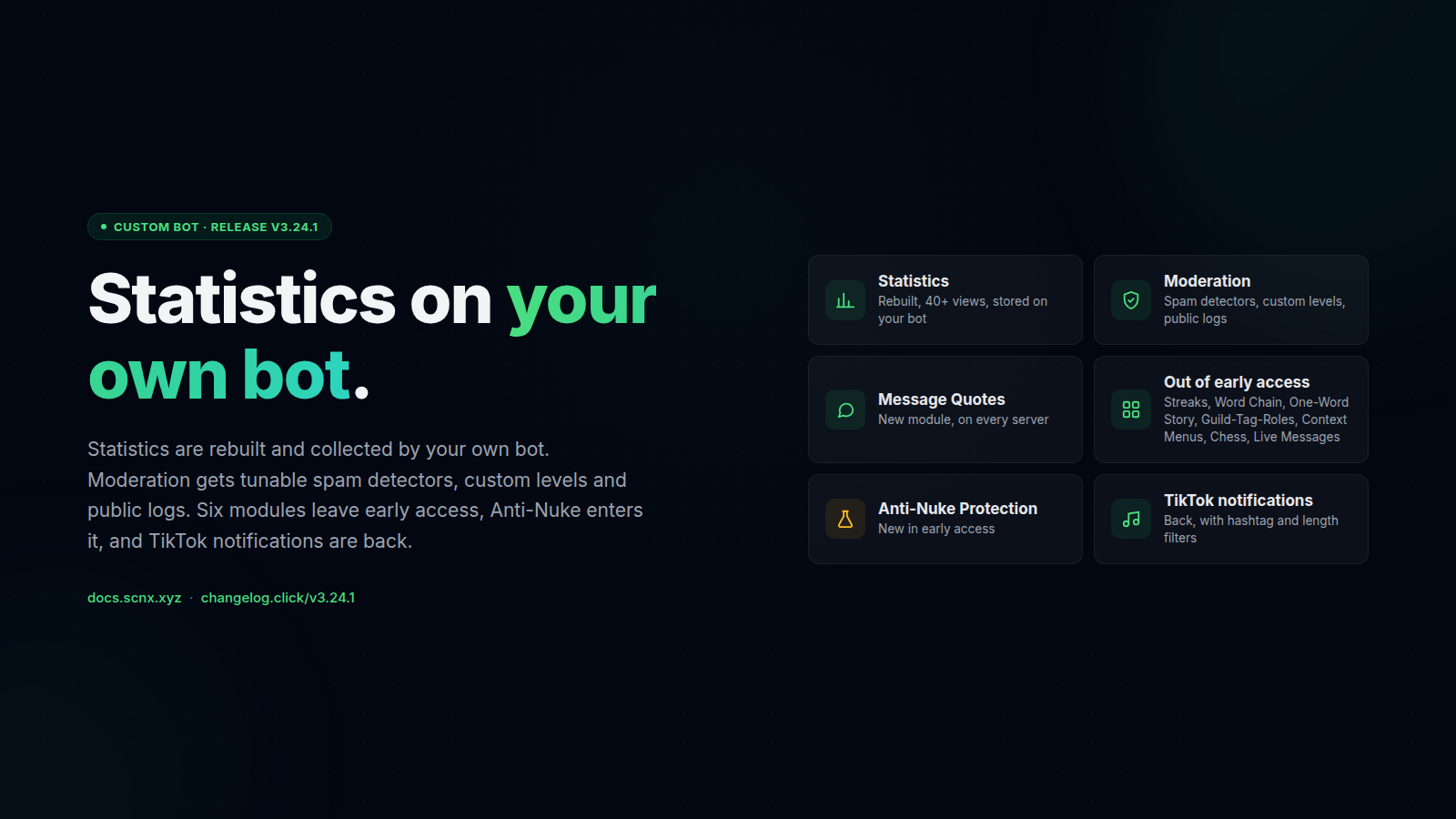
        <content type="html"><![CDATA[<p>v3.24.1 of the SCNX <strong>Custom Bot</strong> is rolling out on the v3 stable branch. There's a lot in it, so here's the short
version first:</p>
<ul>
<li class="">📊 <strong><a class="" href="https://docs.scnx.xyz/it/docs/custom-bot/analytics-data/">Statistics</a> are rebuilt and now run on your own bot.</strong> Over forty views,
stored in your bot's own database. The shared SCNX bot stops collecting.</li>
<li class="">🛡️ <strong><a class="" href="https://docs.scnx.xyz/it/docs/custom-bot/modules/moderation/">Moderation</a> got a big overhaul.</strong> Spam detection split into
separate detectors, moderation levels you define yourself, public logs, a <strong>Lift punishment</strong> button, and native
Discord bans and kicks recorded into the bot.</li>
<li class="">💬 Six modules now on every server and plan: <strong><a class="" href="https://docs.scnx.xyz/it/docs/custom-bot/modules/community/message-quotes/">Message Quotes</a></strong>
(new), <strong><a class="" href="https://docs.scnx.xyz/it/docs/custom-bot/modules/community/activity-streak/">Activity Streaks</a></strong>,
<strong><a class="" href="https://docs.scnx.xyz/it/docs/custom-bot/modules/fun/word-chain/">Word Chain</a></strong>,
<strong><a class="" href="https://docs.scnx.xyz/it/docs/custom-bot/modules/fun/one-word-story/">One-Word Story</a></strong>,
<strong><a class="" href="https://docs.scnx.xyz/it/docs/custom-bot/modules/administration/guild-tag-roles/">Guild-Tag-Roles</a></strong>, and
<strong><a class="" href="https://docs.scnx.xyz/it/docs/custom-bot/commands/">Context Menu Commands</a></strong>.</li>
<li class="">♟️ <strong><a class="" href="https://docs.scnx.xyz/it/docs/custom-bot/modules/fun/chess/">Chess</a></strong> and
<strong><a class="" href="https://docs.scnx.xyz/it/docs/custom-bot/modules/community/live-messages/">Live Messages</a></strong> are out of early access too.</li>
<li class="">🧪 <strong><a class="" href="https://docs.scnx.xyz/it/docs/custom-bot/modules/moderation/anti-nuke/">Anti-Nuke Protection</a></strong> is new in early access.</li>
<li class="">🎵 <strong><a class="" href="https://docs.scnx.xyz/it/docs/custom-bot/modules/integrations/tiktok-notifications/">TikTok notifications</a> work again.</strong></li>
</ul>
<p>Plus <a class="" href="https://docs.scnx.xyz/it/docs/custom-bot/login-as-bot/#scheduling">scheduled and recurring dashboard messages</a>, a reorganised
<a class="" href="https://docs.scnx.xyz/it/docs/custom-bot/modules/administration/logging/">Advanced Logging</a>, and the usual pile of fixes.</p>
<p><span class="testa"> <img decoding="async" loading="lazy" alt="v3.24.1 hero - statistics on your own bot, moderation overhauled, six modules for everyone" src="https://docs.scnx.xyz/it/assets/images/hero-c987c502d695e14fcdde2f2721e49995.png" width="1600" height="900" class="img_ev3q"></span></p>
<h2 class="anchor anchorTargetStickyNavbar_Vzrq" id="statistics-now-run-on-your-own-bot">Statistics now run on your own bot<a href="https://docs.scnx.xyz/it/blog/custom-bot-v3-24-1/#statistics-now-run-on-your-own-bot" class="hash-link" aria-label="Link diretto a Statistics now run on your own bot" title="Link diretto a Statistics now run on your own bot" translate="no">​</a></h2>
<p>The <strong>Statistics</strong> tab has been rebuilt from scratch. Until now, statistics were recorded by the shared SCNX bot for
every server. Starting with v3.24.1, your own bot collects them and stores them in its own database. That data is not
pooled with other servers, and the dashboard does not keep a copy.</p>
<p>The new tab has over forty views: messages and voice time, joins and leaves, which channels are busy and which have gone
quiet, activity by role, your most active members, moderation, tickets, giveaways, levels and more. Cards can be dragged
into any order, and cards you hide are not calculated anymore.</p>
<p>Members get two new commands. <code>/serverstats</code> shows what has been going on in the server, and <code>/mystats</code> shows a member
their own numbers only. Both can be turned off in the settings.</p>
<p>To enable statistics, open <strong>Statistics</strong> in the dashboard and switch it on. The bot restarts once and collects data
from that point onward.</p>
<h3 class="anchor anchorTargetStickyNavbar_Vzrq" id="what-happens-to-existing-statistics">What happens to existing statistics<a href="https://docs.scnx.xyz/it/blog/custom-bot-v3-24-1/#what-happens-to-existing-statistics" class="hash-link" aria-label="Link diretto a What happens to existing statistics" title="Link diretto a What happens to existing statistics" translate="no">​</a></h3>
<p>The shared SCNX bot is being retired as a statistics source. If your server already had statistics, the history was
copied to your own bot and the old copy was deleted. Servers that have not switched yet keep seeing their existing
figures for the time being. The SCNX bot will suspend its analytics features later this year, so it makes sense to
switch before then. How the migration works is described under
<a class="" href="https://docs.scnx.xyz/it/docs/custom-bot/analytics-data/#history-from-before-your-own-bot">history from before your own bot</a>.</p>
<h3 class="anchor anchorTargetStickyNavbar_Vzrq" id="export-delete-and-member-opt-out">Export, delete, and member opt-out<a href="https://docs.scnx.xyz/it/blog/custom-bot-v3-24-1/#export-delete-and-member-opt-out" class="hash-link" aria-label="Link diretto a Export, delete, and member opt-out" title="Link diretto a Export, delete, and member opt-out" translate="no">​</a></h3>
<p>Because the data lives on your bot, you decide what happens to it. Under <strong>Privacy</strong> on the Statistics tab you can
<a class="" href="https://docs.scnx.xyz/it/docs/custom-bot/analytics-data/#getting-a-copy">download everything as a single file</a> or
<a class="" href="https://docs.scnx.xyz/it/docs/custom-bot/analytics-data/#switching-off-and-deleting">delete all of it</a>. Members can
<a class="" href="https://docs.scnx.xyz/it/docs/custom-bot/analytics-data/#letting-members-opt-out">opt out of being counted individually</a> with
<code>/analytics-privacy</code>. Server totals are unaffected by that, only the link to the individual person is removed.</p>
<p>One thing to be aware of before switching it on: as the server owner you are responsible for your members' activity
data, not SCNX. Whether that requires anything on your side, and whether you want to offer the opt-out, depends on your
server. <a class="" href="https://docs.scnx.xyz/it/docs/custom-bot/analytics-data/#what-is-recorded">What is recorded</a> and
<a class="" href="https://docs.scnx.xyz/it/docs/custom-bot/analytics-data/#how-long-it-is-kept">for how long</a> is documented in full.</p>
<h2 class="anchor anchorTargetStickyNavbar_Vzrq" id="moderation">Moderation<a href="https://docs.scnx.xyz/it/blog/custom-bot-v3-24-1/#moderation" class="hash-link" aria-label="Link diretto a Moderation" title="Link diretto a Moderation" translate="no">​</a></h2>
<p>Most of the changes to the <a class="" href="https://docs.scnx.xyz/it/docs/custom-bot/modules/moderation/">Moderation &amp; Security module</a> in this
release came out of support tickets and Featureboard requests. The bigger ones in detail:</p>
<h3 class="anchor anchorTargetStickyNavbar_Vzrq" id="spam-detection-with-separate-detectors">Spam detection with separate detectors<a href="https://docs.scnx.xyz/it/blog/custom-bot-v3-24-1/#spam-detection-with-separate-detectors" class="hash-link" aria-label="Link diretto a Spam detection with separate detectors" title="Link diretto a Spam detection with separate detectors" translate="no">​</a></h3>
<p><a class="" href="https://docs.scnx.xyz/it/docs/custom-bot/modules/moderation/#anti-spam">Anti-spam</a> used to be a fixed set of rules. It is now split
into individual detectors, and each detector has its own enable toggle, threshold, timeframe and action. The
message-rate, duplicate-message, mention and mass-mention checks are still there, and these were added:</p>
<ul>
<li class="">📎 <strong>Attachment and image spam.</strong> Too many files or images in a short window.</li>
<li class="">🔗 <strong>Link spam.</strong> Bursts of links.</li>
<li class="">↩️ <strong>Newline and character floods.</strong> Messages padded with endless line breaks or repeated characters.</li>
<li class="">😀 <strong>Sticker and emoji spam.</strong></li>
<li class="">📢 <strong>Channel spread.</strong> The same user posting across many channels at once.</li>
<li class="">🔠 <strong>Text abuse.</strong> Excessive caps, repeated characters, zalgo text, spoiler spam.</li>
</ul>
<p>Detected spam can be deleted automatically. A global default applies unless a detector overrides it, and auto-delete
removes the whole burst across every channel it landed in. That makes it possible to mute someone for a mass-mention
burst while an emoji flood only gets deleted.</p>
<h3 class="anchor anchorTargetStickyNavbar_Vzrq" id="moderation-levels-you-define-yourself">Moderation levels you define yourself<a href="https://docs.scnx.xyz/it/blog/custom-bot-v3-24-1/#moderation-levels-you-define-yourself" class="hash-link" aria-label="Link diretto a Moderation levels you define yourself" title="Link diretto a Moderation levels you define yourself" translate="no">​</a></h3>
<p>The four fixed Moderator-Level role fields have been replaced by
<a class="" href="https://docs.scnx.xyz/it/docs/custom-bot/modules/moderation/#configuration-modlevels">custom moderation levels</a>. You create as many
named levels as you need and pick what each one can do: warn, mute, kick, ban, lock, channel-mute, quarantine, clear
messages, lift punishments, bypass anti-spam, report immunity, lockdown control and a few more. A trial-mod level might
get warn and mute without ban, and a dedicated anti-raid role could get lockdown control and nothing else.</p>
<p>Existing Level 1 to 4 setups are migrated automatically and keep working as before. The old fields disappear once the
migration has run.</p>
<h3 class="anchor anchorTargetStickyNavbar_Vzrq" id="lifting-punishments-from-the-log">Lifting punishments from the log<a href="https://docs.scnx.xyz/it/blog/custom-bot-v3-24-1/#lifting-punishments-from-the-log" class="hash-link" aria-label="Link diretto a Lifting punishments from the log" title="Link diretto a Lifting punishments from the log" translate="no">​</a></h3>
<p>Moderation log messages and the mod-actions view can show a
<a class="" href="https://docs.scnx.xyz/it/docs/custom-bot/modules/moderation/#lift-punishment"><strong>Lift punishment</strong> button</a>. Clicking it asks for a
reason and reverses the mute, ban, quarantine or warning. The button is opt-in via a new toggle and permission-gated, so
only staff who are allowed to perform that action type can lift it. Typical uses are an accepted appeal or a punishment
that went to the wrong member.</p>
<h3 class="anchor anchorTargetStickyNavbar_Vzrq" id="editable-and-public-log-messages">Editable and public log messages<a href="https://docs.scnx.xyz/it/blog/custom-bot-v3-24-1/#editable-and-public-log-messages" class="hash-link" aria-label="Link diretto a Editable and public log messages" title="Link diretto a Editable and public log messages" translate="no">​</a></h3>
<p>Every <a class="" href="https://docs.scnx.xyz/it/docs/custom-bot/modules/moderation/#configuration-logmessages">moderation log message type</a> now has
its own editable template in the full <a class="" href="https://docs.scnx.xyz/it/docs/scnx/guilds/message-editor/">message editor</a>. An appeal-form link on every
ban notice, for example, is a one-time change to the ban template.</p>
<p>Each action type can additionally post a separate, differently worded <strong>public log</strong> to a second channel. The detailed
internal log stays private while the community sees a short notice. Which action types get a public log is up to you,
whether that is only mutes or every ban. If the same channel is selected for both logs, the dashboard shows a warning,
since every message would otherwise arrive twice.</p>
<h3 class="anchor anchorTargetStickyNavbar_Vzrq" id="native-discord-bans-and-kicks-get-recorded">Native Discord bans and kicks get recorded<a href="https://docs.scnx.xyz/it/blog/custom-bot-v3-24-1/#native-discord-bans-and-kicks-get-recorded" class="hash-link" aria-label="Link diretto a Native Discord bans and kicks get recorded" title="Link diretto a Native Discord bans and kicks get recorded" translate="no">​</a></h3>
<p>Bans, unbans, kicks and timeouts carried out with Discord's built-in tools can now be
<a class="" href="https://docs.scnx.xyz/it/docs/custom-bot/modules/moderation/#native-import">recorded into the bot's moderation database</a> and log
channel. A member's history stays complete even if part of the team uses Discord's right-click Ban instead of the bot.
Optionally, the affected user receives a DM. This is opt-in and only covers actions taken while the bot is running.</p>
<h3 class="anchor anchorTargetStickyNavbar_Vzrq" id="more-options-on-cases">More options on cases<a href="https://docs.scnx.xyz/it/blog/custom-bot-v3-24-1/#more-options-on-cases" class="hash-link" aria-label="Link diretto a More options on cases" title="Link diretto a More options on cases" translate="no">​</a></h3>
<ul>
<li class=""><strong><a class="" href="https://docs.scnx.xyz/it/docs/custom-bot/modules/moderation/#edit-duration">Change the duration</a>.</strong> <code>/moderate edit-duration</code>,
or the <strong>Edit duration</strong> button in the mod-actions view, shortens or extends an active temporary mute, ban or
quarantine. The user is notified by DM, and there is no need to lift and re-apply the punishment.</li>
<li class=""><strong><a class="" href="https://docs.scnx.xyz/it/docs/custom-bot/modules/moderation/#evidence-archival">Up to ten proof images per case</a>.</strong> Several
images can be attached when taking an action (the right-click <strong>Warn / Mute / Kick / Ban</strong> actions accept evidence now
too), or added later through an opt-in <strong>Add proof</strong> button under the log message or <code>/moderate add-proof</code>. The log
message updates itself and shows the images as a gallery. User reports and message reports also get an image-upload
field.</li>
<li class=""><strong><a class="" href="https://docs.scnx.xyz/it/docs/custom-bot/modules/moderation/#involved-users">Tag involved users</a>.</strong> The reporter, a second
account from the same incident, or a witness can be linked to a case for context. Involved users are never punished or
notified. Use the <code>involved</code> option when acting, <code>/moderate involve</code>, or the user picker in the mod-actions view. The
list is available as the <code>%involved%</code> placeholder, so it can appear in the internal log only or in the public one as
well.</li>
<li class=""><strong><a class="" href="https://docs.scnx.xyz/it/docs/custom-bot/modules/moderation/#edit-reason">Edit the reason</a>.</strong> An opt-in <strong>Edit reason</strong> button
and <code>/moderate edit-reason</code> allow rewriting a case's reason after the fact. The change is stored as a case event.</li>
<li class=""><strong>Custom case titles.</strong> Opt-in short titles like "Insulting several users", separate from the longer reason. Once
enabled, the title is a required field on warn, mute, ban, kick, quarantine and channel-mute, including the
right-click modals. Add <code>%title%</code> to your log templates for the titles to show up.</li>
<li class=""><strong><a class="" href="https://docs.scnx.xyz/it/docs/custom-bot/modules/moderation/#actions">Better case history</a>.</strong> <code>/moderate actions</code> opens a
private, filterable view of active and past cases. Filter by action type, inspect case details and open stored
evidence from there. Log messages now reference each other when a decision gets reversed.</li>
</ul>
<h3 class="anchor anchorTargetStickyNavbar_Vzrq" id="scam-links">Scam links<a href="https://docs.scnx.xyz/it/blog/custom-bot-v3-24-1/#scam-links" class="hash-link" aria-label="Link diretto a Scam links" title="Link diretto a Scam links" translate="no">​</a></h3>
<ul>
<li class=""><strong><a class="" href="https://docs.scnx.xyz/it/docs/custom-bot/modules/moderation/#new-member-restrictions">New-member restrictions</a>.</strong> Require a
minimum time on the server before new members can post attachments or links. Messages that break the rule are deleted
with a notice, with optional escalation for repeat offenders. This targets throwaway accounts that join and paste a
scam link within the first minute.</li>
<li class=""><strong>Better scam-link detection.</strong> Scam and phishing URLs are now matched against a fresher, SCNX-maintained list, with
optional heuristics for suspicious links. The previous lists had gone stale. The new source covers the Steam, Nitro
and crypto-giveaway scams that spike around big game launches and events.</li>
<li class=""><strong>Delete only.</strong> For scam links, blacklisted words and invites, the offending message can now be removed without
punishing the member.</li>
</ul>
<p>Fixes in this area: an expired quarantine no longer comes back when the member rejoins,
<a class="" href="https://docs.scnx.xyz/it/docs/custom-bot/modules/moderation/#verification">verification</a> no longer hands back roles the join gate
just removed, verification continues after a quarantine release, the verification button answers reliably, manual
verification no longer gets stuck after a rejoin or a deleted review message, and the
<a class="" href="https://docs.scnx.xyz/it/docs/custom-bot/modules/moderation/#join-gate">join gate</a> and automatic lockdown trigger correctly again.</p>
<h2 class="anchor anchorTargetStickyNavbar_Vzrq" id="six-modules-now-on-every-server">Six modules, now on every server<a href="https://docs.scnx.xyz/it/blog/custom-bot-v3-24-1/#six-modules-now-on-every-server" class="hash-link" aria-label="Link diretto a Six modules, now on every server" title="Link diretto a Six modules, now on every server" translate="no">​</a></h2>
<p>All of these are available on every server and every plan starting today.</p>
<h3 class="anchor anchorTargetStickyNavbar_Vzrq" id="-message-quotes-new">💬 <a class="" href="https://docs.scnx.xyz/it/docs/custom-bot/modules/community/message-quotes/">Message Quotes</a> (new)<a href="https://docs.scnx.xyz/it/blog/custom-bot-v3-24-1/#-message-quotes-new" class="hash-link" aria-label="Link diretto a -message-quotes-new" title="Link diretto a -message-quotes-new" translate="no">​</a></h3>
<p>Paste a Discord message link and the bot posts it as a readable quote in the current channel. There is also a <strong>Quote
Message</strong> action in Discord's <strong>Apps</strong> menu. The output is built in the message editor, so you control what is shown:
author, nickname, avatar, channel, content, timestamp, link and first image. Roles, channels or whole categories can be
excluded, bot messages and self-quotes can be allowed or blocked, and the trigger message can be deleted. Users can only
quote messages they are allowed to read. With
<a class="" href="https://docs.scnx.xyz/it/docs/custom-bot/modules/community/message-quotes/#image-archival">attachment archival</a> enabled, quoted images are
uploaded to your <a class="" href="https://docs.scnx.xyz/it/docs/scnx/guilds/files/">file library</a>. Enable it from the
<a href="https://scnx.app/glink?page=bot/modules?query=message-quotes" target="_blank" rel="noopener noreferrer" class="">module catalog</a>.</p>
<h3 class="anchor anchorTargetStickyNavbar_Vzrq" id="-activity-streaks">🔥 <a class="" href="https://docs.scnx.xyz/it/docs/custom-bot/modules/community/activity-streak/">Activity Streaks</a><a href="https://docs.scnx.xyz/it/blog/custom-bot-v3-24-1/#-activity-streaks" class="hash-link" aria-label="Link diretto a -activity-streaks" title="Link diretto a -activity-streaks" translate="no">​</a></h3>
<p>Members build a streak by being active every day, week or month, and lose it when they go quiet. <code>/streak</code> shows a
member their run and <code>/streak leaderboard</code> shows who is keeping the longest one. New in this release: a configurable
window for how many days after losing a streak members can still recover it with <code>/streak restore</code>. Restoring a backup
also brings back every member's streak.</p>
<h3 class="anchor anchorTargetStickyNavbar_Vzrq" id="-word-chain">🔗 <a class="" href="https://docs.scnx.xyz/it/docs/custom-bot/modules/fun/word-chain/">Word Chain</a><a href="https://docs.scnx.xyz/it/blog/custom-bot-v3-24-1/#-word-chain" class="hash-link" aria-label="Link diretto a -word-chain" title="Link diretto a -word-chain" translate="no">​</a></h3>
<p>Every new word has to start with the last letter of the previous one. The bot checks each entry and tracks how far the
server gets before someone breaks the chain.</p>
<h3 class="anchor anchorTargetStickyNavbar_Vzrq" id="-one-word-story">📖 <a class="" href="https://docs.scnx.xyz/it/docs/custom-bot/modules/fun/one-word-story/">One-Word Story</a><a href="https://docs.scnx.xyz/it/blog/custom-bot-v3-24-1/#-one-word-story" class="hash-link" aria-label="Link diretto a -one-word-story" title="Link diretto a -one-word-story" translate="no">​</a></h3>
<p>The community writes a story together, one word per person. Since nobody can steer it alone, the result is rarely what
anyone expected.</p>
<h3 class="anchor anchorTargetStickyNavbar_Vzrq" id="️-guild-tag-roles">🏷️ <a class="" href="https://docs.scnx.xyz/it/docs/custom-bot/modules/administration/guild-tag-roles/">Guild-Tag-Roles</a><a href="https://docs.scnx.xyz/it/blog/custom-bot-v3-24-1/#%EF%B8%8F-guild-tag-roles" class="hash-link" aria-label="Link diretto a ️-guild-tag-roles" title="Link diretto a ️-guild-tag-roles" translate="no">​</a></h3>
<p>Members who wear your server's guild tag get a role for it, and lose the role again when they take the tag off.</p>
<h3 class="anchor anchorTargetStickyNavbar_Vzrq" id="️-context-menu-commands">🖱️ <a class="" href="https://docs.scnx.xyz/it/docs/custom-bot/commands/">Context Menu Commands</a><a href="https://docs.scnx.xyz/it/blog/custom-bot-v3-24-1/#%EF%B8%8F-context-menu-commands" class="hash-link" aria-label="Link diretto a ️-context-menu-commands" title="Link diretto a ️-context-menu-commands" translate="no">​</a></h3>
<p>Bot actions such as the
<a class="" href="https://docs.scnx.xyz/it/docs/custom-bot/modules/moderation/#context-menu-actions">moderation context-menu actions</a> can be run from
Discord's <strong>Apps</strong> menu by right-clicking a member or message. The new <a class="" href="https://docs.scnx.xyz/it/docs/custom-bot/commands/">Commands page</a> in
the dashboard lets you pick which actions are available, rename them, and disable slash commands you do not use. Context
actions are off by default and keep their normal permission requirements. Discord allows up to 15 user actions and 15
message actions per bot.</p>
<h2 class="anchor anchorTargetStickyNavbar_Vzrq" id="chess-and-live-messages-leave-early-access">Chess and Live Messages leave early access<a href="https://docs.scnx.xyz/it/blog/custom-bot-v3-24-1/#chess-and-live-messages-leave-early-access" class="hash-link" aria-label="Link diretto a Chess and Live Messages leave early access" title="Link diretto a Chess and Live Messages leave early access" translate="no">​</a></h2>
<p><strong><a class="" href="https://docs.scnx.xyz/it/docs/custom-bot/modules/fun/chess/">Chess</a></strong> is now on every server and plan. A full game against another member or
the bot inside a thread, a freshly drawn board after every move, and a leaderboard. Promoting a pawn to a rook, bishop
or knight now keeps the selected piece, which did not always work before.</p>
<p><strong><a class="" href="https://docs.scnx.xyz/it/docs/custom-bot/modules/community/live-messages/">Live Messages</a></strong> joins it. Messages that display live server
statistics such as member counts, online members, boosts and channels, kept up to date by the bot. Both are in the
<a href="https://scnx.app/glink?page=bot/modules" target="_blank" rel="noopener noreferrer" class="">module catalog</a>.</p>
<h2 class="anchor anchorTargetStickyNavbar_Vzrq" id="anti-nuke-protection-in-early-access">Anti-Nuke Protection, in early access<a href="https://docs.scnx.xyz/it/blog/custom-bot-v3-24-1/#anti-nuke-protection-in-early-access" class="hash-link" aria-label="Link diretto a Anti-Nuke Protection, in early access" title="Link diretto a Anti-Nuke Protection, in early access" translate="no">​</a></h2>
<p>New for ScootKit Membership early-access holders, with general availability in the usual 3 to 4 month window.</p>
<p><a class="" href="https://docs.scnx.xyz/it/docs/custom-bot/modules/moderation/anti-nuke/">Anti-Nuke</a> watches for destructive server actions and responds
according to rules you set. It looks for mass channel and role changes, bans, kicks, webhook abuse, permission
escalation, emoji and sticker deletion, destructive server changes and more. Once a threshold is reached it can alert
your team, strip the attacker's roles, remove dangerous permissions, or ban them. Alerts come with a guided undo flow
that tries to restore what was affected and then reports what worked and what did not. Operators can check the status,
temporarily whitelist a trusted member with an expiry and reason, and set thresholds per action type. Only users on the
<strong>Exempt Users</strong> list can use any of it.</p>
<p>Anti-Nuke is a mitigation layer, not a backup and not a guarantee. It only works while the bot is online, some Discord
actions cannot be fully reversed, and anyone who can reconfigure the bot can get around it. The
<a class="" href="https://docs.scnx.xyz/it/docs/custom-bot/modules/moderation/anti-nuke/">documentation</a> lists those limitations before the setup steps, and they
are worth reading first.</p>
<h2 class="anchor anchorTargetStickyNavbar_Vzrq" id="tiktok-notifications-are-back">TikTok notifications are back<a href="https://docs.scnx.xyz/it/blog/custom-bot-v3-24-1/#tiktok-notifications-are-back" class="hash-link" aria-label="Link diretto a TikTok notifications are back" title="Link diretto a TikTok notifications are back" translate="no">​</a></h2>
<p><a class="" href="https://docs.scnx.xyz/it/docs/custom-bot/modules/integrations/tiktok-notifications/">TikTok creator notifications</a> work again, with one
restriction that comes from TikTok's API: notifications only work for creators who have connected their TikTok account
to SCNX. The creator goes through the SCNX creator-claim flow once. After that, notifications arrive automatically, and
no bot restart is needed.</p>
<p>The rebuild also added a <strong>Required hashtag</strong> filter, a <strong>Minimum clip length</strong> filter, and <code>%thumbnailUrl%</code> and
<code>%description%</code> placeholders for the notification message.</p>
<h2 class="anchor anchorTargetStickyNavbar_Vzrq" id="other-changes-worth-knowing-about">Other changes worth knowing about<a href="https://docs.scnx.xyz/it/blog/custom-bot-v3-24-1/#other-changes-worth-knowing-about" class="hash-link" aria-label="Link diretto a Other changes worth knowing about" title="Link diretto a Other changes worth knowing about" translate="no">​</a></h2>
<ul>
<li class=""><strong><a class="" href="https://docs.scnx.xyz/it/docs/custom-bot/login-as-bot/#scheduling">Scheduled and recurring messages</a>.</strong> A dashboard message can be
scheduled for later, edited or cancelled, or repeated daily, weekly or monthly. Recurring schedules survive restarts.
If the bot was offline, missed recurring occurrences are skipped, and an overdue one-time message is sent once the bot
is back. A recurring series counts as one pending message. <a class="" href="https://docs.scnx.xyz/it/docs/scnx/guilds/plans/">Limits</a> are 2 on Starter, 10 on
Active Guild, 25 on Pro/Unlimited and 50 on Professional/Enterprise.</li>
<li class=""><strong><a class="" href="https://docs.scnx.xyz/it/docs/custom-bot/modules/administration/logging/">Advanced Logging</a>, reorganised.</strong> The settings are grouped into
sections for messages, members, roles, channels, voice, server changes and emojis. Each section can ignore all bots or
specific bots, and new filters skip noisy role, channel and voice changes. Role changes by the same person in quick
succession are combined into one entry with the net result, so large role operations no longer flood the channel. Role
logs also list every changed role instead of only the last one.</li>
<li class=""><strong><a class="" href="https://docs.scnx.xyz/it/docs/custom-bot/modules/administration/auto-delete/">Auto Delete</a> keeps bot panels.</strong> Channel cleanup no longer
removes active application and ticket panels, giveaways, polls, live messages, leaderboards, partner and team lists,
starboard posts, suggestions, sticky messages, advent calendars, and other long-lived messages maintained by an
enabled module.</li>
<li class=""><strong><a class="" href="https://docs.scnx.xyz/it/docs/custom-bot/modules/community/giveaways/">Giveaways</a>: participant lists.</strong> An optional <strong>View participants</strong>
button lets members privately browse a paginated list of entrants with entry weight and requirement status. Staff can
use <code>/gmanage participants</code>. Rapid entries no longer get lost when many people join at the same time.</li>
<li class=""><strong><a class="" href="https://docs.scnx.xyz/it/docs/custom-bot/modules/integrations/youtube-notifications/">YouTube notifications</a> are faster.</strong> Channels are
checked much more often, so go-live and new-video alerts arrive sooner. A new per-channel setting skips premieres and
scheduled streams until they are published as regular videos, and a broken thumbnail no longer blocks the
notification.</li>
<li class=""><strong><a class="" href="https://docs.scnx.xyz/it/docs/custom-bot/modules/support/tickets/">Tickets</a>: copy category permissions.</strong> Off by default. When enabled, the
permission overwrites from the ticket category are copied to each new ticket channel, with <code>@everyone</code> still denied.</li>
<li class=""><strong><a class="" href="https://docs.scnx.xyz/it/docs/custom-bot/modules/community/birthday/">Birthday</a>: separate reminder channel.</strong> Pre-birthday reminders can go
to their own channel instead of the birthday channel.</li>
<li class=""><strong>Fewer "interaction failed" errors.</strong> Slower actions such as creating or closing tickets, voting in polls, revoking
invites and restarting verification now answer Discord in time.</li>
<li class=""><strong>Better protection for stored data.</strong> Information your server stores now gets additional protection automatically,
without any change in how the bot is used.</li>
<li class=""><strong>Module activation tells you when a restart is needed.</strong> If a newly enabled module needs additional Discord access,
the bot says so instead of silently not working.</li>
</ul>
<p>For everything else (<a class="" href="https://docs.scnx.xyz/it/docs/custom-bot/modules/support/applications/">Applications</a>,
<a class="" href="https://docs.scnx.xyz/it/docs/custom-bot/modules/moderation/staff-management/">Staff Management</a>,
<a class="" href="https://docs.scnx.xyz/it/docs/custom-bot/modules/administration/welcomer/">Welcomer</a>, <a class="" href="https://docs.scnx.xyz/it/docs/custom-bot/modules/community/color-me/">Color-me</a>,
AI Chat Channel, <a class="" href="https://docs.scnx.xyz/it/docs/custom-bot/modules/community/economy-system/">Economy</a>,
<a class="" href="https://docs.scnx.xyz/it/docs/custom-bot/modules/community/polls/">Polls</a>, <a class="" href="https://docs.scnx.xyz/it/docs/custom-bot/modules/tools/auto-publisher/">Auto-Publisher</a> and
a few more), the full per-module list is in the <a href="https://changelog.click/v3.24.1" target="_blank" rel="noopener noreferrer" class="">in-dashboard changelog</a>.</p>
<h2 class="anchor anchorTargetStickyNavbar_Vzrq" id="how-to-update">How to update<a href="https://docs.scnx.xyz/it/blog/custom-bot-v3-24-1/#how-to-update" class="hash-link" aria-label="Link diretto a How to update" title="Link diretto a How to update" translate="no">​</a></h2>
<p>If your bot is on the v3 branch, restart it once and v3.24.1 is live. Existing configurations keep working, and old
moderator levels are migrated into the new system automatically.</p>
<p>A few settings are worth going through deliberately rather than leaving on defaults:</p>
<ol>
<li class=""><strong>Statistics.</strong> Read <a class="" href="https://docs.scnx.xyz/it/docs/custom-bot/analytics-data/">what is recorded</a>, decide whether to offer members the
opt-out, then switch it on under <strong>Statistics</strong>. The bot restarts once. Do this before the shared SCNX bot stops
collecting later this year.</li>
<li class=""><strong>Anti-spam.</strong> Existing rules carry over, but the
<a class="" href="https://docs.scnx.xyz/it/docs/custom-bot/modules/moderation/#anti-spam">new detectors</a> (attachment spam, link spam, floods,
channel spread, text abuse) should get thresholds and actions that match what your server actually sees.</li>
<li class=""><strong>Log templates.</strong> The defaults are fine if nothing was customised. If custom case titles are turned on, add
<code>%title%</code> to the templates, otherwise the titles will not show anywhere.</li>
<li class=""><strong>Context menu commands.</strong> They are off by default. Enable the ones your staff would use on the
<a class="" href="https://docs.scnx.xyz/it/docs/custom-bot/commands/">Commands page</a>.</li>
</ol>
<h2 class="anchor anchorTargetStickyNavbar_Vzrq" id="run-into-a-bug">Run into a bug?<a href="https://docs.scnx.xyz/it/blog/custom-bot-v3-24-1/#run-into-a-bug" class="hash-link" aria-label="Link diretto a Run into a bug?" title="Link diretto a Run into a bug?" translate="no">​</a></h2>
<p>If something looks broken, open a ticket at <a href="https://scnx.app/help" target="_blank" rel="noopener noreferrer" class="">scnx.app/help</a> and our support team will take a
look. For feature requests and bigger ideas, Featureboard is still the right place.</p>
<p>Greetings from Munich,<br>
<!-- -->- Simon</p>]]></content>
        <author>
            <name>Simon</name>
            <email>simon@scootkit.com</email>
            <uri>https://scderox.de</uri>
        </author>
        <category label="Custom Bot" term="Custom Bot"/>
        <category label="Release" term="Release"/>
        <category label="Modules" term="Modules"/>
        <category label="Moderation" term="Moderation"/>
    </entry>
    <entry>
        <title type="html"><![CDATA[Custom Bot v3.23.1: five new modules and the long list behind them]]></title>
        <id>https://docs.scnx.xyz/it/blog/custom-bot-v3-23-1/</id>
        <link href="https://docs.scnx.xyz/it/blog/custom-bot-v3-23-1/"/>
        <updated>2026-05-23T10:00:00.000Z</updated>
        <summary type="html"><![CDATA[A big Custom Bot release. Staff Management is now available on every server, four more modules join in early access (Chess, Guild-Tag-Roles, One-Word Story, Word Chain), verification gets a new in-channel flow, quarantine holds up against the workarounds people kept finding, and moderation evidence stops disappearing when Discord's CDN expires.]]></summary>
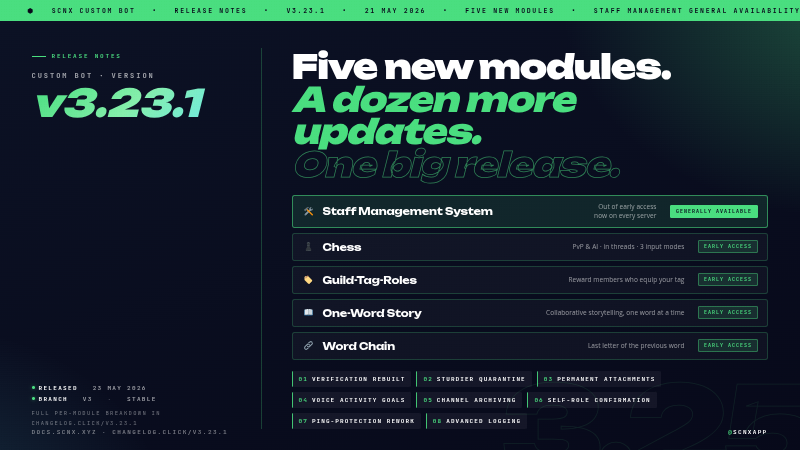
        <content type="html"><![CDATA[<p>Big one for the SCNX <strong>Custom Bot</strong> today. v3.23.1 is rolling out on the v3 stable branch - here's the short version:</p>
<ul>
<li class="">🛠️ <strong>Staff Management System</strong> is out of early access. Available on every server now.</li>
<li class="">♟️ Four more modules join in early access: <strong>Chess</strong>, <strong>Guild-Tag-Roles</strong>, <strong>One-Word Story</strong>, <strong>Word Chain</strong>.</li>
<li class="">🔐 <strong>Verification has been rebuilt.</strong> New in-channel flow, no DMs required.</li>
<li class="">🛡️ <strong>Quarantine is sturdier.</strong> It now holds up across bot restarts, member rejoins, and staff stripping the role
manually.</li>
<li class="">📥 <strong>Permanent attachment storage.</strong> Moderation evidence and starboard images upload to your scnx file library, so
they keep working long after Discord's CDN URLs would have expired.</li>
</ul>
<p>Plus the usual long list of polish and fixes across nearly every module.</p>
<p><span class="testa"> <img decoding="async" loading="lazy" alt="v3.23.1 hero  - five new modules and a dozen updates" src="https://docs.scnx.xyz/it/assets/images/hero-cd688943549db700feefd0378a148b14.png" width="800" height="450" class="img_ev3q"></span></p>
<h2 class="anchor anchorTargetStickyNavbar_Vzrq" id="staff-management-system-is-now-available-to-everyone">Staff Management System is now available to everyone<a href="https://docs.scnx.xyz/it/blog/custom-bot-v3-23-1/#staff-management-system-is-now-available-to-everyone" class="hash-link" aria-label="Link diretto a Staff Management System is now available to everyone" title="Link diretto a Staff Management System is now available to everyone" translate="no">​</a></h2>
<p>Staff Management has been the most-requested module on Featureboard for a long time, and after months of early-access
testing on member servers it's now live on every server, on every plan. It's a single module designed to replace the
patchwork of bots, spreadsheets and forum threads most servers end up cobbling together to run their team.</p>
<p>What's in it:</p>
<ul>
<li class="">⏱️ <strong>Shifts.</strong> Clock in, clock out, take breaks. Configurable duty types, weekly or monthly quotas, a duty-time
leaderboard, and an audit channel that records every shift event.</li>
<li class="">🌴 <strong>Leave of absence and reduced activity.</strong> Members request time off inside Discord, supervisors approve in one
click, and the bot can auto-assign a status role for the duration.</li>
<li class="">⚠️ <strong>Infractions and suspensions.</strong> Warnings, strikes, demotions, terminations, "under investigation" markers.
Temporary suspensions strip staff roles for the duration and restore them when the suspension ends.</li>
<li class="">🎖️ <strong>Promotions.</strong> One command, optional auto-assignment of the new role, and a customisable announcement.</li>
<li class="">👤 <strong>Staff profiles and reviews.</strong> 1 to 5 star ratings, review history, reputation tracking that members can
contribute to.</li>
<li class="">✅ <strong>Activity checks.</strong> Periodic check-ins on selected roles with full responded, missing, and follow-up tracking.</li>
<li class="">🔐 <strong>Three-tier access.</strong> Staff, Supervisor, and Management role tiers each unlock the appropriate command level.</li>
</ul>
<p>Enable it from the <a href="https://scnx.app/glink?page=bot/modules?query=staff-management-system" target="_blank" rel="noopener noreferrer" class="">module catalog</a>. The
<a href="https://docs.scnx.xyz/docs/custom-bot/modules/moderation/staff-management" target="_blank" rel="noopener noreferrer" class="">setup guide</a> walks through the first-run
configuration.</p>
<h2 class="anchor anchorTargetStickyNavbar_Vzrq" id="four-new-modules-in-early-access">Four new modules in early access<a href="https://docs.scnx.xyz/it/blog/custom-bot-v3-23-1/#four-new-modules-in-early-access" class="hash-link" aria-label="Link diretto a Four new modules in early access" title="Link diretto a Four new modules in early access" translate="no">​</a></h2>
<p>The other four ship today in early access for ScootKit Membership early-access holders, with general availability in
the usual 3 to 4 month window.</p>
<h3 class="anchor anchorTargetStickyNavbar_Vzrq" id="️-chess">♟️ Chess<a href="https://docs.scnx.xyz/it/blog/custom-bot-v3-23-1/#%EF%B8%8F-chess" class="hash-link" aria-label="Link diretto a ♟️ Chess" title="Link diretto a ♟️ Chess" translate="no">​</a></h3>
<p>Full chess against other server members or the built-in AI, played out in dedicated threads so long games don't choke
your main channel. Three ways to move (algebraic in chat, a popup with notation input, or guided dropdowns), live
material balance in the embed, auto-flipping board renders so you always see your own pieces at the bottom, AI on Easy,
Medium, or Hard, draws, resignations, history, and configurable move timeouts with reminder pings. Start with <code>/chess challenge @user</code> or <code>/chess challenge-ai</code>.</p>
<h3 class="anchor anchorTargetStickyNavbar_Vzrq" id="️-guild-tag-roles">🏷️ Guild-Tag-Roles<a href="https://docs.scnx.xyz/it/blog/custom-bot-v3-23-1/#%EF%B8%8F-guild-tag-roles" class="hash-link" aria-label="Link diretto a 🏷️ Guild-Tag-Roles" title="Link diretto a 🏷️ Guild-Tag-Roles" translate="no">​</a></h3>
<p>Reward users who equip your server's guild tag with one or more roles. The bot adds the configured roles when the tag
is activated and removes them when it's taken off. The role list is configured in module settings.</p>
<h3 class="anchor anchorTargetStickyNavbar_Vzrq" id="-one-word-story">📖 One-Word Story<a href="https://docs.scnx.xyz/it/blog/custom-bot-v3-23-1/#-one-word-story" class="hash-link" aria-label="Link diretto a 📖 One-Word Story" title="Link diretto a 📖 One-Word Story" translate="no">​</a></h3>
<p>Collaborative storytelling where each member adds exactly one word at a time. Configure story channels, an optional
archive channel, and a moderator role. Supports word caps, idle hints, and customisable milestones.</p>
<h3 class="anchor anchorTargetStickyNavbar_Vzrq" id="-word-chain">🔗 Word Chain<a href="https://docs.scnx.xyz/it/blog/custom-bot-v3-23-1/#-word-chain" class="hash-link" aria-label="Link diretto a 🔗 Word Chain" title="Link diretto a 🔗 Word Chain" translate="no">​</a></h3>
<p>Each new word starts with the last letter of the previous one. Pick the channels it runs in, set a minimum word length,
and decide whether words can repeat. Includes milestone messages, idle hints, and <code>/word-chain reset</code> for moderators.</p>
<h2 class="anchor anchorTargetStickyNavbar_Vzrq" id="verification-without-the-dms">Verification, without the DMs<a href="https://docs.scnx.xyz/it/blog/custom-bot-v3-23-1/#verification-without-the-dms" class="hash-link" aria-label="Link diretto a Verification, without the DMs" title="Link diretto a Verification, without the DMs" translate="no">​</a></h2>
<p>The old verification flow DMed users a captcha. A lot of people have DMs disabled by default these days, and when that
happened the bot couldn't reach them. The fallback was usually "ask a mod", which kind of defeats the point of having
an automated gate.</p>
<p>The new flow moves the entire thing into the channel. The user clicks a <strong>Verify Me</strong> button on the verification
message, the challenge appears for that user only, they solve it, they get the role.</p>
<p>Three modes to pick from:</p>
<ul>
<li class=""><strong>Captcha</strong> (default). A captcha image rendered directly in the channel, only visible to the user. Right default for
most servers.</li>
<li class=""><strong>Simple.</strong> A quick math problem or word challenge in a popup. Less bot-resistant but much faster for humans. Useful
for audiences that would bounce off a captcha.</li>
<li class=""><strong>Manual.</strong> Users press a button to request verification, staff approve or deny it from the log channel. Right pick
for invite-only communities.</li>
</ul>
<p>The old captcha is still there as <strong>Captcha (DM, legacy)</strong>, so existing setups keep working untouched. The new flow
also gives users multiple attempts (default 3) with a cooldown between tries (default 5 minutes), instead of punishing
on the first failed try. The punishment duration is configurable too (default 1 hour), so a typo doesn't earn a
permanent mute.</p>
<h2 class="anchor anchorTargetStickyNavbar_Vzrq" id="quarantine-that-actually-sticks">Quarantine that actually sticks<a href="https://docs.scnx.xyz/it/blog/custom-bot-v3-23-1/#quarantine-that-actually-sticks" class="hash-link" aria-label="Link diretto a Quarantine that actually sticks" title="Link diretto a Quarantine that actually sticks" translate="no">​</a></h2>
<p>A few server owners wrote in about quarantine being trivially worked around. They were right. Three problems we fixed:</p>
<ol>
<li class=""><strong>Leave-and-rejoin defeated it.</strong> A user could shed the quarantine role by leaving the server and rejoining. The
role wasn't reapplied. It is now, no matter how long they were gone. Works for every trigger: manual, Join Gate,
Anti-Join-Raid, Anti-Grief, AutoMod, failed verification, and the message filters.</li>
<li class=""><strong>Other bots and reaction roles could grant access back.</strong> New opt-in option <strong>Strip new roles from quarantined
users</strong>. Any role added to a quarantined user (via Discord's role picker, a reaction role, or another bot) gets
removed automatically. Server boosts and managed roles are left alone.</li>
<li class=""><strong>Staff could bypass the audit log by removing the role manually.</strong> New opt-in option that reapplies the quarantine
if a staff member strips it without running <code>/moderate unquarantine</code>, and posts a log entry naming who did it.
Forces every unquarantine through the auditable command path.</li>
</ol>
<p>Alongside that, a stack of smaller moderation fixes. Channel locks no longer skip roles whose write permission was
inherited from the server or category level. Repeated anti-spam and anti-raid triggers don't stack actions on the same
user anymore. Long moderation reasons no longer crash the log entry. <code>/moderate ban</code> with <code>days</code> actually deletes
messages again (Discord.js renamed the option, we caught up). Unmute and unquarantine preserve role prefixes and active
streak suffixes on the nickname instead of wiping them off.</p>
<h2 class="anchor anchorTargetStickyNavbar_Vzrq" id="permanent-attachment-storage">Permanent attachment storage<a href="https://docs.scnx.xyz/it/blog/custom-bot-v3-23-1/#permanent-attachment-storage" class="hash-link" aria-label="Link diretto a Permanent attachment storage" title="Link diretto a Permanent attachment storage" translate="no">​</a></h2>
<p>If you've been on SCNX long enough you've probably seen this one. A moderation case from six months ago, you click the
evidence link, "this image is no longer available". Discord's CDN URLs expire. The image was always gone, the link was
just silently rotting.</p>
<p>v3.23.1 fixes that for the two places it stung most:</p>
<ul>
<li class=""><strong>Moderation evidence.</strong> Attached proof files upload to your scnx file library, and the case log links to the
permanent URL.</li>
<li class=""><strong>Starboard images.</strong> Images on starred messages upload to your file library and embed via a permanent link, so
pinned highlights from a year ago still render.</li>
</ul>
<p>There's also a new opt-in setting in Advanced Logging, <strong>Archive attachments from deleted messages</strong>, for servers
whose policy supports retaining deleted-message content. Off by default.</p>
<p>Stored files count against your <a href="https://scnx.app/glink?page=images" target="_blank" rel="noopener noreferrer" class="">file-storage quota</a>. If you'd rather not have any
of this, the new <strong>Disable attachment archival</strong> core setting opts out of everything in one toggle. Features that
depend on permanent URLs will fall back to the old behaviour and break when Discord's URLs expire, but it's your call.</p>
<h2 class="anchor anchorTargetStickyNavbar_Vzrq" id="other-things-worth-pulling-out">Other things worth pulling out<a href="https://docs.scnx.xyz/it/blog/custom-bot-v3-23-1/#other-things-worth-pulling-out" class="hash-link" aria-label="Link diretto a Other things worth pulling out" title="Link diretto a Other things worth pulling out" translate="no">​</a></h2>
<p>Two more headline additions that didn't fit a section of their own:</p>
<ul>
<li class=""><strong>Temp Channels: Channel Archiving.</strong> When everyone leaves a temp channel, it can now be moved to a hidden archive
category instead of being deleted. When the creator rejoins the creation channel, their archived channel is restored
with its previous settings (public or private mode, allowed users) intact.</li>
<li class=""><strong>Team Goals: Voice Activity Goals.</strong> Staff can now be evaluated on voice activity alongside the existing message
goal. Weekly voice-minute targets, per-role overrides, a <code>/team-goals voice-progress</code> command, separate
achieved-and-failed message templates, and <code>%voiceMinutes%</code> and <code>%voiceGoal%</code> placeholders.</li>
</ul>
<p>And a grab bag of changes most servers will notice:</p>
<ul>
<li class=""><strong>Self-role dropdowns now confirm before applying.</strong> Picking roles in a self-role dropdown opens an ephemeral
confirmation listing what will be added or removed. Apply or cancel. The original public message stays untouched.</li>
<li class=""><strong>Admin Tools: Always-Temporary Roles and Role Bans.</strong> Define roles that auto-expire after a configurable duration
(e.g. <code>24h</code>), and roles that auto-ban anyone who gets them. Members with <strong>Manage Roles</strong> are exempt from role bans.</li>
<li class=""><strong>Welcomer: treat join roles as base roles.</strong> Opt-in setting that keeps every regular member's join roles in sync. If
one gets removed, the bot adds it back, including after a quarantine release. Quarantined and pending members are
excluded so it doesn't interfere with moderation.</li>
<li class=""><strong>Levels: daily stats and richer level-ups.</strong> <code>/profile</code> shows messages today and voice time today next to lifetime
totals. Level-up messages get seven new placeholders (<code>%xpGained%</code>, <code>%xpType%</code>, <code>%totalXP%</code>, <code>%nextLevelXP%</code>,
<code>%totalMessages%</code>, <code>%messagesToday%</code>, <code>%voiceTimeToday%</code>). New <code>/calculate-level</code> command shows exactly how much XP a
target level costs.</li>
<li class=""><strong>Birthday: a lot of it.</strong> A <strong>Set Birthday</strong> button on the embed (configurable label), an option to disable year
input, a Components V2 layout, a user-display-mode picker (mention, tag, or nickname), daily channel cleanup,
pre-birthday notifications with configurable lead times, and a new <code>/birthday upcoming</code> subcommand.</li>
<li class=""><strong>Ping Protection: reworked user panel.</strong> <code>/ping-protection user panel</code> is now a dropdown-driven view with granular
data deletion (pings only, moderation history only, or a full wipe with cooldowns), role-based ping thresholds per
rule, and category-level whitelisting.</li>
<li class=""><strong>Advanced Logging: more honest log channel.</strong> Bans and unbans are recorded again (regression fixed), kicks are
logged too, and member joins and leaves get their own log with account age on joins and tenure plus roles-at-leave
on leaves.</li>
<li class=""><strong>AI Chat Channel.</strong> The "Troll" and "Conspiracy theorist / Liar" personalities have been retired for EU AI Act
compliance. Servers using them fall back to the default personality on next reload. Custom system prompts and the
remaining personalities are unaffected.</li>
</ul>
<p>For the rest (Activity Streak, Applications, Color-me, AFK, Giveaways, Holidays, Invite Tracking, Info Commands,
Levels, Name-List Cleaner, Nicknames, Polls, Quiz, Starboard, Suggestions, Team-List, Twitch and YouTube
notifications, and a fair bit of cross-cutting infrastructure), the full per-module breakdown is in the <a href="https://changelog.click/v3.23.1" target="_blank" rel="noopener noreferrer" class="">in-dashboard
changelog</a>.</p>
<h2 class="anchor anchorTargetStickyNavbar_Vzrq" id="how-to-update">How to update<a href="https://docs.scnx.xyz/it/blog/custom-bot-v3-23-1/#how-to-update" class="hash-link" aria-label="Link diretto a How to update" title="Link diretto a How to update" translate="no">​</a></h2>
<p>If you're on the v3 branch, restart your bot once and v3.23.1 is live. The new modules show up in the module catalog,
the new options are visible in their settings pages, and existing configurations keep working as before.</p>
<p>Two things are worth flipping intentionally rather than leaving on defaults:</p>
<ol>
<li class=""><strong>Verification.</strong> If you'd like the new in-channel flow, head to verification settings and switch the mode. Legacy
DM captcha stays selected for existing servers, so nothing changes until you opt in.</li>
<li class=""><strong>Attachment archival.</strong> Defaults are sensible (moderation and starboard on, deleted-message logging off). If
storage quota matters to you, check your usage on the <a href="https://scnx.app/glink?page=images" target="_blank" rel="noopener noreferrer" class="">files page</a> and decide
whether to opt out via the <strong>Disable attachment archival</strong> core setting.</li>
</ol>
<h2 class="anchor anchorTargetStickyNavbar_Vzrq" id="run-into-a-bug">Run into a bug?<a href="https://docs.scnx.xyz/it/blog/custom-bot-v3-23-1/#run-into-a-bug" class="hash-link" aria-label="Link diretto a Run into a bug?" title="Link diretto a Run into a bug?" translate="no">​</a></h2>
<p>If something looks broken, open a ticket at <a href="https://scnx.app/help" target="_blank" rel="noopener noreferrer" class="">scnx.app/help</a> and our support team will take a
look. For feature requests and bigger ideas, Featureboard is still the right place.</p>
<p>Greetings from Munich,<br>
<!-- -->- Simon</p>]]></content>
        <author>
            <name>Simon</name>
            <email>simon@scootkit.com</email>
            <uri>https://scderox.de</uri>
        </author>
        <category label="Custom Bot" term="Custom Bot"/>
        <category label="Release" term="Release"/>
        <category label="Modules" term="Modules"/>
    </entry>
    <entry>
        <title type="html"><![CDATA[Message Editor V4 is out of beta]]></title>
        <id>https://docs.scnx.xyz/it/blog/message-editor-v4-ga/</id>
        <link href="https://docs.scnx.xyz/it/blog/message-editor-v4-ga/"/>
        <updated>2026-05-07T10:00:00.000Z</updated>
        <summary type="html"><![CDATA[V4 of the Message Editor is out of beta and available to everyone. Drag-and-drop components, containers, sections, media galleries, and a lot more room to design messages than the old embed system gave you.]]></summary>
        <content type="html"><![CDATA[<p>V4 of the Message Editor is out of beta. If you log into your dashboard right now, it's there - any plan, any server,
no toggle to flip. The Membership early-access window is over.</p>
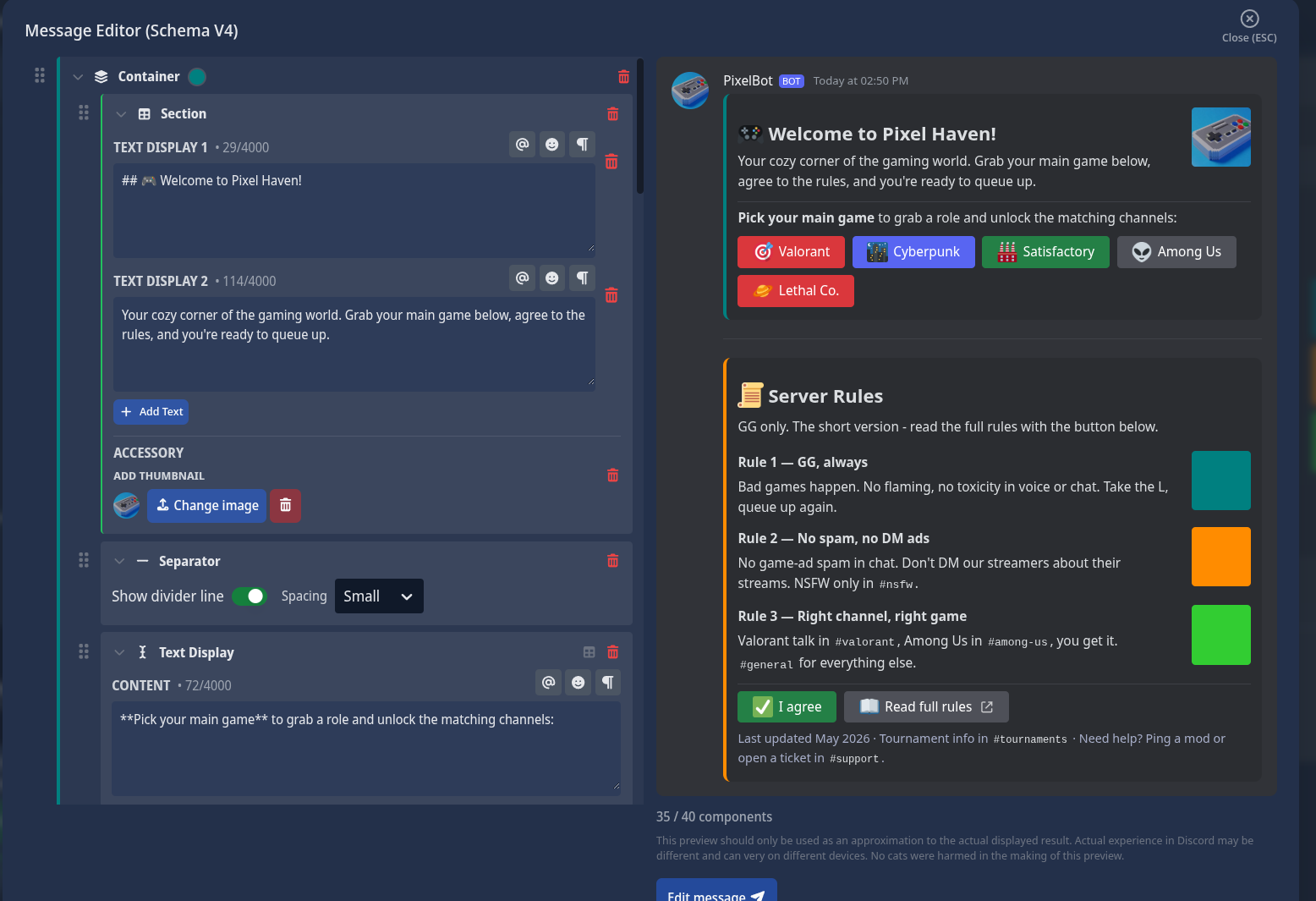
<p><span class="testa"> <img decoding="async" loading="lazy" alt="A Pixel Haven welcome and rules message built in V4 - teal welcome container with the server icon and game role buttons, an orange rules container with three sectioned rules each with their own thumbnail, and an &amp;quot;I agree&amp;quot; / &amp;quot;Read full rules&amp;quot; action row" src="https://docs.scnx.xyz/it/assets/images/pixelheavenexample1-440d7a50556656aaacf104076b111480.png" width="1556" height="1065" class="img_ev3q"></span></p>
<p>I sat on this one for a few months while we ran the beta with our Members, and I'm honestly relieved to be shipping it
to everyone. The TL;DR: V4 messages can do things V3 messages can't, and the editor itself is much nicer to live in.</p>
<h2 class="anchor anchorTargetStickyNavbar_Vzrq" id="what-changed">What changed<a href="https://docs.scnx.xyz/it/blog/message-editor-v4-ga/#what-changed" class="hash-link" aria-label="Link diretto a What changed" title="Link diretto a What changed" translate="no">​</a></h2>
<p>Building a message in SCNX used to mean wrangling embeds. You got 10 of them. They sat below your message content. Your
buttons ended up at the bottom of the message no matter what you did. If you wanted a different shape, tough.</p>
<p>Discord shipped a new system - <strong>Components V2</strong> - that gets you out of that. V4 is our editor for it. Easier to show
than tell, so:</p>
<h2 class="anchor anchorTargetStickyNavbar_Vzrq" id="stuff-v4-lets-you-do">Stuff V4 lets you do<a href="https://docs.scnx.xyz/it/blog/message-editor-v4-ga/#stuff-v4-lets-you-do" class="hash-link" aria-label="Link diretto a Stuff V4 lets you do" title="Link diretto a Stuff V4 lets you do" translate="no">​</a></h2>
<p>A few things that were awkward or impossible before.</p>
<h3 class="anchor anchorTargetStickyNavbar_Vzrq" id="sections-text-on-the-left-accessory-on-the-right">Sections: text on the left, accessory on the right<a href="https://docs.scnx.xyz/it/blog/message-editor-v4-ga/#sections-text-on-the-left-accessory-on-the-right" class="hash-link" aria-label="Link diretto a Sections: text on the left, accessory on the right" title="Link diretto a Sections: text on the left, accessory on the right" translate="no">​</a></h3>
<p>The thing I missed most in V3: putting an image <em>next to</em> a paragraph. Embeds let you have a thumbnail in the
top-right, but it was always tiny and always in the corner. If you also wanted a button - well, the button went to the
bottom of the message, not next to the text it belonged with. So you'd write a paragraph, point to it, and hope the
reader scrolled down and back up to see what the button actually did.</p>
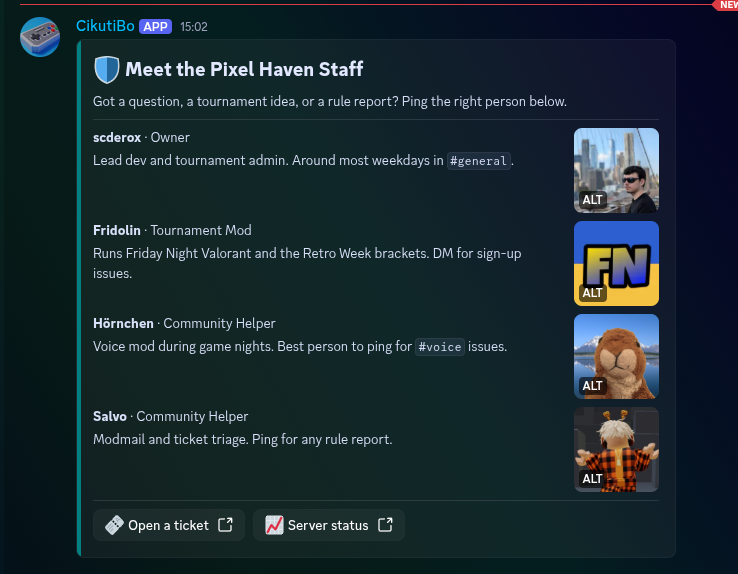
<p>Sections fix this. Text on the left, one accessory on the right (either a thumbnail or a button), in the same row. Two
Pixel Haven examples - import either to a test field to see what I mean.</p>
<p>The thumbnail variant is a "Meet the staff" card. Each section is one team member, their bio, and their avatar
beside it:</p>
<p><span class="testa"> <img decoding="async" loading="lazy" alt="A &amp;quot;Meet the Pixel Haven Staff&amp;quot; card with four sections, each showing a team member&amp;#39;s name, role, short bio, and avatar thumbnail" src="https://docs.scnx.xyz/it/assets/images/pixelheaven-meet-the-team-b5c4f14d3e2a8ba7ec1154d7f1fa6411.png" width="738" height="574" class="img_ev3q"></span></p>
<p><a href="https://scnx.app/import/message?key=cmovhp20v003m7br1jrfl7odx&amp;source=marketplace" target="_blank" rel="noopener noreferrer" class=""><strong>Import the Staff Card</strong></a></p>
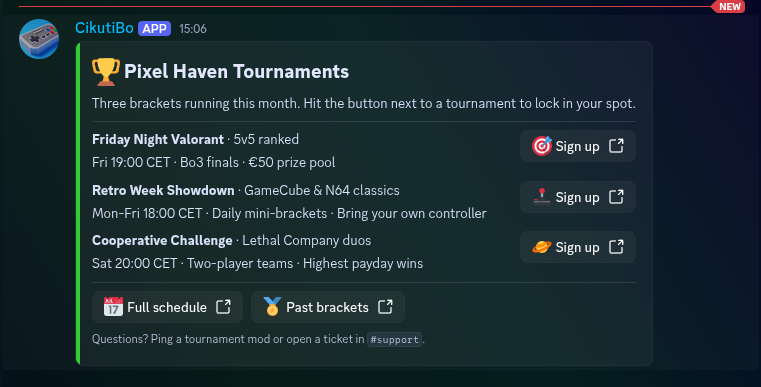
<p>The button variant is a tournament list - each section is a bracket, and the "Sign up" button sits where you'd
naturally click it:</p>
<p><span class="testa"> <img decoding="async" loading="lazy" alt="A &amp;quot;Pixel Haven Tournaments&amp;quot; card with three tournament sections, each showing the bracket name, schedule, and a green &amp;quot;Sign up&amp;quot; button as the section accessory" src="https://docs.scnx.xyz/it/assets/images/pixel-heaven-tournaments-9884408a50672efc124ccff0896adaeb.png" width="761" height="387" class="img_ev3q"></span></p>
<p><a href="https://scnx.app/import/message?key=cmovhvesr003p7br183mbrplm&amp;source=marketplace" target="_blank" rel="noopener noreferrer" class=""><strong>Import the Tournament Schedule</strong></a></p>
<h3 class="anchor anchorTargetStickyNavbar_Vzrq" id="multiple-embeds-with-text-and-buttons-in-any-order">Multiple "embeds" with text and buttons in any order<a href="https://docs.scnx.xyz/it/blog/message-editor-v4-ga/#multiple-embeds-with-text-and-buttons-in-any-order" class="hash-link" aria-label="Link diretto a Multiple &quot;embeds&quot; with text and buttons in any order" title="Link diretto a Multiple &quot;embeds&quot; with text and buttons in any order" translate="no">​</a></h3>
<p>In V3 the order was fixed: message content on top, then embeds, then buttons, in that order. Always. In V4 you can
stack containers however you want, with their own colors and their own buttons inside each one:</p>
<p><span class="testa"> <img decoding="async" loading="lazy" alt="A Pixel Haven welcome and rules message built in V4 - teal welcome container with the server icon and game role buttons, an orange rules container with three sectioned rules each with their own thumbnail, and an &amp;quot;I agree&amp;quot; / &amp;quot;Read full rules&amp;quot; action row" src="https://docs.scnx.xyz/it/assets/images/pixelheavenexample1-440d7a50556656aaacf104076b111480.png" width="1556" height="1065" class="img_ev3q"></span></p>
<p>Server icon sits next to the greeting. Each rule has its own little thumbnail. The buttons are right there with the
content they belong to. One message, no second post needed.</p>
<p><a href="https://scnx.app/import/message?key=cmovh1czb003j7br1da3gjacn&amp;source=marketplace" target="_blank" rel="noopener noreferrer" class=""><strong>Import the Welcome + Rules message</strong></a></p>
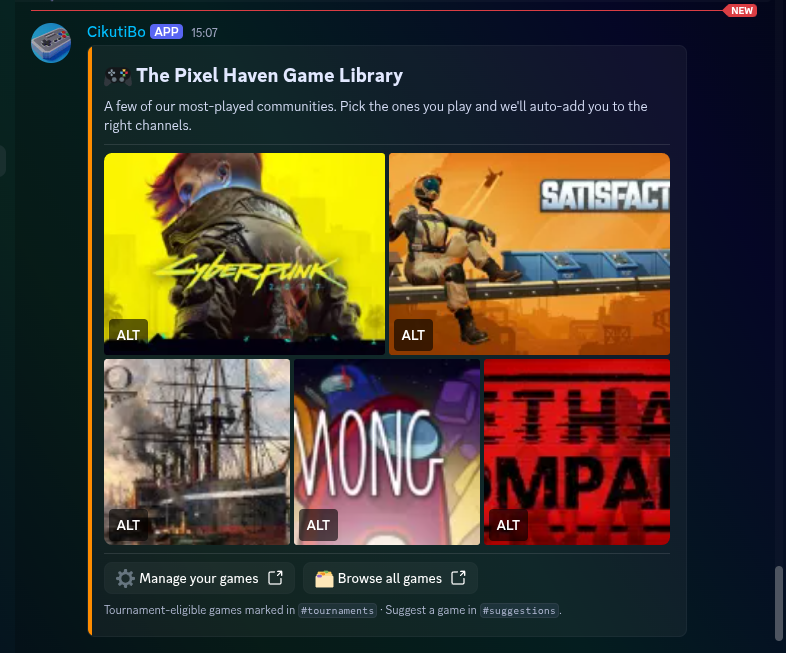
<h3 class="anchor anchorTargetStickyNavbar_Vzrq" id="a-real-image-grid">A real image grid<a href="https://docs.scnx.xyz/it/blog/message-editor-v4-ga/#a-real-image-grid" class="hash-link" aria-label="Link diretto a A real image grid" title="Link diretto a A real image grid" translate="no">​</a></h3>
<p>V3 was rough on images. The first one went into the embed, the rest got attached at the bottom, and the order Discord
chose to show them in was its own business. Media Gallery is a proper grid component now, with alt text on every
image.</p>
<p><span class="testa"> <img decoding="async" loading="lazy" alt="A &amp;quot;Pixel Haven Game Library&amp;quot; card with a five-tile media gallery showing Steam capsule artwork for Cyberpunk 2077, Satisfactory, Anno 1800, Among Us, and Lethal Company, with &amp;quot;Manage your games&amp;quot; / &amp;quot;Browse all games&amp;quot; buttons below" src="https://docs.scnx.xyz/it/assets/images/pixel-haeven-game-libary-719a45e1160bfb959dbec71d333d37df.png" width="786" height="653" class="img_ev3q"></span></p>
<p><a href="https://scnx.app/import/message?key=cmovhp591003n7br19dxv36ah&amp;source=marketplace" target="_blank" rel="noopener noreferrer" class=""><strong>Import the Game Library</strong></a> - five
Steam capsules in a grid, with two CTAs underneath. The kind of thing you'd pin to a <code>#welcome</code> channel.</p>
<h2 class="anchor anchorTargetStickyNavbar_Vzrq" id="drag-to-reorder">Drag to reorder<a href="https://docs.scnx.xyz/it/blog/message-editor-v4-ga/#drag-to-reorder" class="hash-link" aria-label="Link diretto a Drag to reorder" title="Link diretto a Drag to reorder" translate="no">​</a></h2>
<p>Everything in V4 is draggable. Components inside containers, options inside dropdowns, buttons inside action rows. If
you've ever wanted to move an embed three slots up in V3 and ended up just rebuilding the whole message because that
was faster, you'll appreciate this immediately.</p>
<h2 class="anchor anchorTargetStickyNavbar_Vzrq" id="autocomplete">Autocomplete<a href="https://docs.scnx.xyz/it/blog/message-editor-v4-ga/#autocomplete" class="hash-link" aria-label="Link diretto a Autocomplete" title="Link diretto a Autocomplete" translate="no">​</a></h2>
<p>Small thing but I keep noticing it: type <code>%</code> in any text field and you get a menu of every parameter available there -
<code>%userTag%</code>, <code>%guildName%</code>, <code>%memberCount%</code>, etc., with a description on each one. Arrow keys to pick, enter to drop
it in. No more flipping back to the docs to remember if it's <code>%userTag%</code> or <code>%user_tag%</code>.</p>
<p>Same trigger pattern for emoji (<code>:</code>) and for <code>@</code> and <code>#</code> mentions in fields that support them.</p>
<h2 class="anchor anchorTargetStickyNavbar_Vzrq" id="the-full-component-list">The full component list<a href="https://docs.scnx.xyz/it/blog/message-editor-v4-ga/#the-full-component-list" class="hash-link" aria-label="Link diretto a The full component list" title="Link diretto a The full component list" translate="no">​</a></h2>
<p>For reference, here's everything you can drop into a V4 message:</p>
<table><thead><tr><th>Component</th><th>What it does</th></tr></thead><tbody><tr><td><strong>Text Display</strong></td><td>A markdown text block. Up to 4,000 characters.</td></tr><tr><td><strong>Container</strong></td><td>Groups components with an accent color. The closest thing to an embed in V4, just less rigid.</td></tr><tr><td><strong>Section</strong></td><td>1-3 lines of text paired with a thumbnail or button on the right.</td></tr><tr><td><strong>Media Gallery</strong></td><td>1-10 images, in a grid that actually behaves like a grid.</td></tr><tr><td><strong>Action Row</strong></td><td>Up to 5 buttons, or a dropdown.</td></tr><tr><td><strong>Separator</strong></td><td>A divider, with or without a line.</td></tr><tr><td><strong>Image</strong></td><td>One uploaded image, anywhere you want it.</td></tr><tr><td><strong>Dynamic Image</strong></td><td>Per-message generated image (same as in V3).</td></tr></tbody></table>
<p>40 per message, all draggable, containers can hold any of the above except other containers.</p>
<h2 class="anchor anchorTargetStickyNavbar_Vzrq" id="where-it-shows-up">Where it shows up<a href="https://docs.scnx.xyz/it/blog/message-editor-v4-ga/#where-it-shows-up" class="hash-link" aria-label="Link diretto a Where it shows up" title="Link diretto a Where it shows up" translate="no">​</a></h2>
<p>Everywhere SCNX has a message editor. <a class="" href="https://docs.scnx.xyz/it/docs/custom-bot/login-as-bot/">Bot Log-In</a> messages,
<a class="" href="https://docs.scnx.xyz/it/docs/custom-bot/custom-commands/">Custom Commands</a>, <a class="" href="https://docs.scnx.xyz/it/docs/support-bot/intro/">Support Bot</a> templates, welcome and
level-up messages in the various module configs, and so on. The parameters work the same, copy/paste between fields
works the same, the share-link feature works the same. The fields just have V4 available now wherever they make sense.</p>
<h2 class="anchor anchorTargetStickyNavbar_Vzrq" id="on-v3-already">On V3 already?<a href="https://docs.scnx.xyz/it/blog/message-editor-v4-ga/#on-v3-already" class="hash-link" aria-label="Link diretto a On V3 already?" title="Link diretto a On V3 already?" translate="no">​</a></h2>
<p>You don't have to do anything. V3 is still the default in most places, there's no deprecation clock, and existing
messages keep working. If embeds do the job for you, leave them.</p>
<p>If you do want to bring something into V4, the V3 toolbar has a <strong>Convert to V4 Editor</strong> button. It maps embeds to
containers, buttons to action rows, thumbnails to section accessories. Two caveats:</p>
<ol>
<li class="">One-way - you can't convert back.</li>
<li class="">Author icons, footer icons, and embed timestamps have no V4 equivalent. They'll be dropped during conversion.</li>
</ol>
<p>The full mapping is <a class="" href="https://docs.scnx.xyz/it/docs/scnx/guilds/message-editor/#migration">in the docs</a>.</p>
<h2 class="anchor anchorTargetStickyNavbar_Vzrq" id="try-it">Try it<a href="https://docs.scnx.xyz/it/blog/message-editor-v4-ga/#try-it" class="hash-link" aria-label="Link diretto a Try it" title="Link diretto a Try it" translate="no">​</a></h2>
<p>Open any message editor field, click <strong>Switch to V4 Editor</strong>, start dragging stuff in. The
<a class="" href="https://docs.scnx.xyz/it/docs/scnx/guilds/message-editor/">Message Editor documentation</a> has the full component reference, the limits page,
and the V3 → V4 conversion table.</p>
<p>If you build something and hit a wall - a component you wish existed, a flow that feels off, a limit that bit you -
let me know on <a href="https://featureboard.net/" target="_blank" rel="noopener noreferrer" class="">Featureboard</a> (search for "Message Editor", there's already a thread or two)
or in the <a href="https://scootk.it/dc-de" target="_blank" rel="noopener noreferrer" class="">SCNX Discord</a>. The beta caught a lot, but you'll find things we didn't.</p>
<p>Greetings from Munich,<br>
<!-- -->- Simon</p>]]></content>
        <author>
            <name>Simon</name>
            <email>simon@scootkit.com</email>
            <uri>https://scderox.de</uri>
        </author>
        <category label="SCNX" term="SCNX"/>
        <category label="Message Editor" term="Message Editor"/>
        <category label="Components V2" term="Components V2"/>
    </entry>
    <entry>
        <title type="html"><![CDATA[Voice Support, now in early access]]></title>
        <id>https://docs.scnx.xyz/it/blog/voice-support-early-access/</id>
        <link href="https://docs.scnx.xyz/it/blog/voice-support-early-access/"/>
        <updated>2026-04-23T10:00:00.000Z</updated>
        <summary type="html"><![CDATA[The SCNX Support Bot gets a third system - a live voice queue. Available today to ScootKit Membership early-access holders; free for everyone on SCNX in a few months.]]></summary>
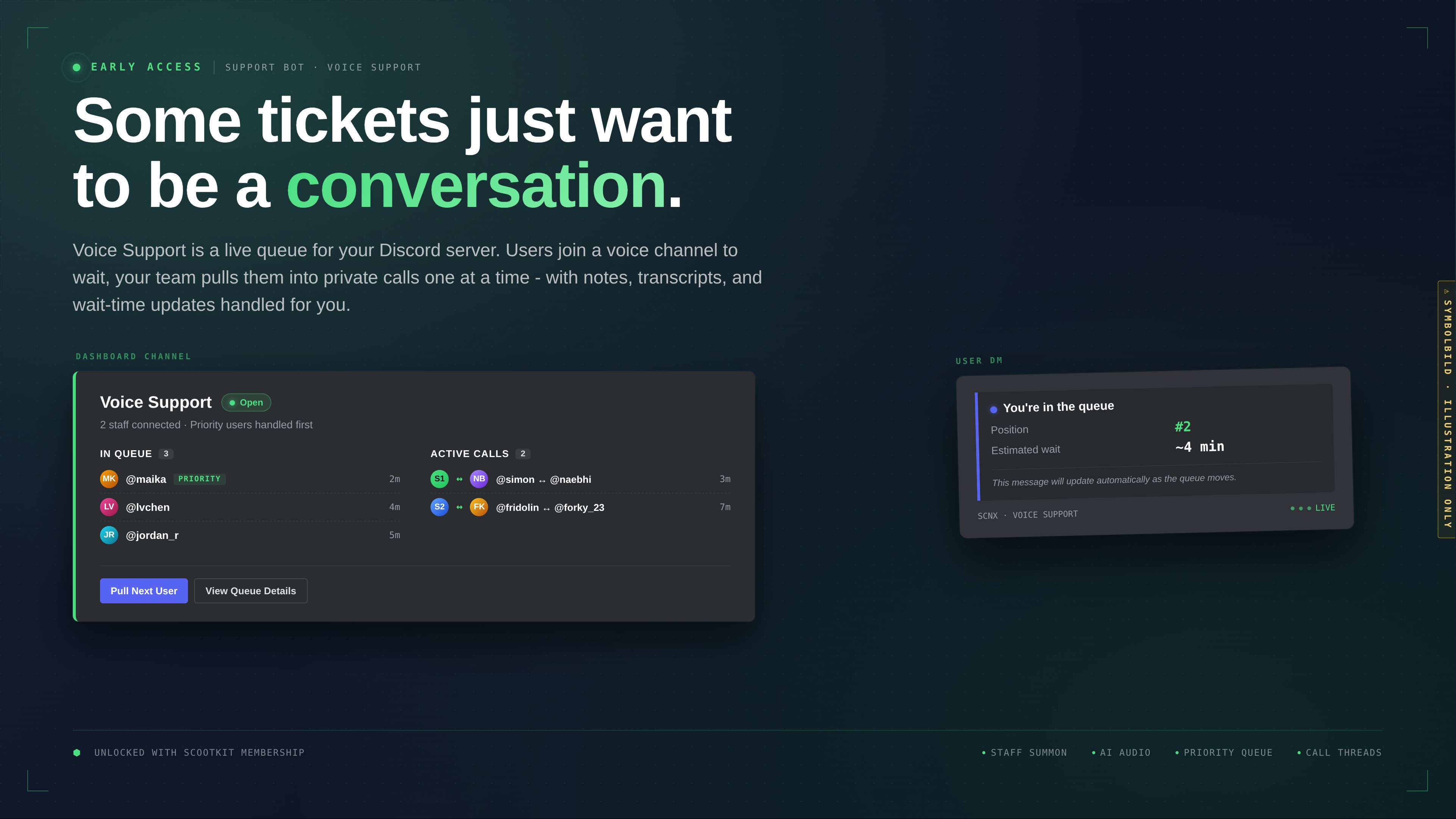
        <content type="html"><![CDATA[<p>We've added a third system to the Support Bot: <strong>Voice Support</strong>, a live voice queue. Users join a voice channel, your
team pulls them into a support channel one at a time, and the bot handles the queueing, wait-time DMs, notes, thread
archival, and feedback in between.</p>
<p><span class="testa"> <img decoding="async" loading="lazy" alt="Illustration of the Voice Support dashboard embed showing the queue, active calls, and a user&amp;#39;s position DM" src="https://docs.scnx.xyz/it/assets/images/en-500eb00fb5d949696de398b4712b3fc2.jpg" width="3842" height="2161" class="img_ev3q"></span></p>
<p>It's shipping today in early access for holders of the <a href="https://membership.scootkit.com/" target="_blank" rel="noopener noreferrer" class="">ScootKit Membership</a> Early
Access perk. Like everything we release this way, it'll be free for every SCNX server about 3 - 4 months from now.</p>
<h2 class="anchor anchorTargetStickyNavbar_Vzrq" id="the-dev-journey-on-video">The dev journey, on video<a href="https://docs.scnx.xyz/it/blog/voice-support-early-access/#the-dev-journey-on-video" class="hash-link" aria-label="Link diretto a The dev journey, on video" title="Link diretto a The dev journey, on video" translate="no">​</a></h2>
<p>I posted two updates on YouTube while building this - more "here's what I'm working on" than polished product demos.
They're rougher than what you see in the dashboard today (naming, UI and some flows changed since), but if you want a
sense of how Voice Support actually came together, they're the honest version.</p>
<p>Members already saw these when they went up. Now they're here for everyone.</p>
<div class="theme-admonition theme-admonition-note admonition_xJq3 alert alert--secondary"><div class="admonitionHeading_Gvgb"><span class="admonitionIcon_Rf37"><svg viewBox="0 0 14 16"><path fill-rule="evenodd" d="M6.3 5.69a.942.942 0 0 1-.28-.7c0-.28.09-.52.28-.7.19-.18.42-.28.7-.28.28 0 .52.09.7.28.18.19.28.42.28.7 0 .28-.09.52-.28.7a1 1 0 0 1-.7.3c-.28 0-.52-.11-.7-.3zM8 7.99c-.02-.25-.11-.48-.31-.69-.2-.19-.42-.3-.69-.31H6c-.27.02-.48.13-.69.31-.2.2-.3.44-.31.69h1v3c.02.27.11.5.31.69.2.2.42.31.69.31h1c.27 0 .48-.11.69-.31.2-.19.3-.42.31-.69H8V7.98v.01zM7 2.3c-3.14 0-5.7 2.54-5.7 5.68 0 3.14 2.56 5.7 5.7 5.7s5.7-2.55 5.7-5.7c0-3.15-2.56-5.69-5.7-5.69v.01zM7 .98c3.86 0 7 3.14 7 7s-3.14 7-7 7-7-3.12-7-7 3.14-7 7-7z"></path></svg></span>Auto-dubbed audio</div><div class="admonitionContent_BuS1"><p>The videos below are separate YouTube uploads with <strong>auto-dubbed English audio</strong> generated from my original German
recordings - not a human-voiced English version. Expect AI pronunciation quirks on product names, code snippets, and the
occasional proper noun. If you'd rather hear the native German, the originals live at <a href="https://youtu.be/tUVS5tE5mOg" target="_blank" rel="noopener noreferrer" class="">
<code>tUVS5tE5mOg</code></a> and <a href="https://youtu.be/2PUBNawPE0k" target="_blank" rel="noopener noreferrer" class=""><code>2PUBNawPE0k</code></a> on YouTube.</p></div></div>
<div style="justify-content:center" class="card flex items-center video-consent"><div><div style="text-align:center"><svg data-prefix="fab" data-icon="youtube" class="svg-inline--fa fa-youtube video-consent-icon" role="img" viewBox="0 0 576 512" aria-hidden="true"><path fill="currentColor" d="M549.7 124.1C543.5 100.4 524.9 81.8 501.4 75.5 458.9 64 288.1 64 288.1 64S117.3 64 74.7 75.5C51.2 81.8 32.7 100.4 26.4 124.1 15 167 15 256.4 15 256.4s0 89.4 11.4 132.3c6.3 23.6 24.8 41.5 48.3 47.8 42.6 11.5 213.4 11.5 213.4 11.5s170.8 0 213.4-11.5c23.5-6.3 42-24.2 48.3-47.8 11.4-42.9 11.4-132.3 11.4-132.3s0-89.4-11.4-132.3zM232.2 337.6l0-162.4 142.7 81.2-142.7 81.2z"></path></svg></div><div class="video-consent-header" style="margin-top:5px;font-weight:bold;text-align:center">There's a YouTube Video here</div><div class="video-consent-description" style="margin-top:3px;text-align:center">By clicking below, you agree to YouTube's <a href="https://policies.google.com/privacy?hl=en-US" target="_blank">Privacy Policy</a>.</div><div style="margin-top:12px;text-align:center"><button class="button button--primary">Accept and load YouTube video<!-- --> <svg data-prefix="fas" data-icon="circle-arrow-right" class="svg-inline--fa fa-circle-arrow-right" role="img" viewBox="0 0 512 512" aria-hidden="true" style="margin-left:5px"><path fill="currentColor" d="M256 512a256 256 0 1 0 0-512 256 256 0 1 0 0 512zm41-159c-9.4 9.4-24.6 9.4-33.9 0s-9.4-24.6 0-33.9l39-39-150.1 0c-13.3 0-24-10.7-24-24s10.7-24 24-24l150.1 0-39-39c-9.4-9.4-9.4-24.6 0-33.9s24.6-9.4 33.9 0l80 80c9.4 9.4 9.4 24.6 0 33.9l-80 80z"></path></svg></button></div></div></div>
<h2 class="anchor anchorTargetStickyNavbar_Vzrq" id="what-it-does">What it does<a href="https://docs.scnx.xyz/it/blog/voice-support-early-access/#what-it-does" class="hash-link" aria-label="Link diretto a What it does" title="Link diretto a What it does" translate="no">​</a></h2>
<p>From the user side:</p>
<ol>
<li class="">Join the configured queue voice channel.</li>
<li class="">The bot DMs you with your position and an estimated wait time. The DM updates itself as the queue moves.</li>
<li class="">When a staff member pulls you, you're moved into their support channel.</li>
<li class="">The call happens. When it ends, you optionally rate it.</li>
</ol>
<p>From the staff side:</p>
<ol>
<li class="">Sit in any voice channel in the configured support category.</li>
<li class="">Click <strong>Pull Next User</strong> on the dashboard, or run <code>/voice next</code>.</li>
<li class="">The user lands in your channel. Buttons in the voice chat let you add notes, look up the user's prior sessions, or
end the call.</li>
<li class="">If debriefs are on, a form pops up after the call. If feedback is on, the user gets a rating DM.</li>
</ol>
<p>Two state modes cover the common cases:</p>
<ul>
<li class=""><strong>Staff presence</strong> - open whenever at least one staff member is in voice.</li>
<li class=""><strong>Opening hours</strong> - open during configured business hours regardless of who's online. Can be combined with a
staff-summon ping that fires when users arrive but no staff are connected.</li>
</ul>
<h2 class="anchor anchorTargetStickyNavbar_Vzrq" id="the-rest-of-the-feature-list">The rest of the feature list<a href="https://docs.scnx.xyz/it/blog/voice-support-early-access/#the-rest-of-the-feature-list" class="hash-link" aria-label="Link diretto a The rest of the feature list" title="Link diretto a The rest of the feature list" translate="no">​</a></h2>
<ul>
<li class=""><strong>Priority queue</strong> via configurable roles.</li>
<li class=""><strong>Waiting music</strong> (per-channel playlist, and a separate closed-state playlist for after-hours listeners).</li>
<li class=""><strong>AI-generated audio</strong> - a <strong>Generate (AI)</strong> tab in the audio picker produces TTS clips and background music, paid in
AI Coins. <a class="" href="https://docs.scnx.xyz/it/docs/support-bot/voice-support/ai-audio/">Details here</a>.</li>
<li class=""><strong>Per-call notes</strong> and <strong>call history</strong> (10 prior sessions per user, with duration, assigned staff, and recent notes
inline).</li>
<li class=""><strong>Call threads</strong> under your dashboard channel, pre-filled with the user's prior context.</li>
<li class=""><strong>Debrief form</strong> for staff, <strong>feedback DM</strong> for users, both optional and both with logging.</li>
<li class=""><strong>Per-user blocklist</strong> with optional reason + expiration.</li>
<li class=""><strong>Adaptive wait-time estimate</strong> based on a rolling window of recent calls.</li>
</ul>
<p>Full reference: <a class="" href="https://docs.scnx.xyz/it/docs/support-bot/voice-support/intro/">Voice Support docs</a>.</p>
<h2 class="anchor anchorTargetStickyNavbar_Vzrq" id="getting-access">Getting access<a href="https://docs.scnx.xyz/it/blog/voice-support-early-access/#getting-access" class="hash-link" aria-label="Link diretto a Getting access" title="Link diretto a Getting access" translate="no">​</a></h2>
<p>Voice Support needs two things:</p>
<ol>
<li class="">An active SCNX <strong>Unlimited</strong> or <strong>Professional</strong> plan (like the rest of the Support Bot - it's not available on the free Starter plan).</li>
<li class="">The Early Access perk on <a href="https://membership.scootkit.com/" target="_blank" rel="noopener noreferrer" class="">ScootKit Membership</a> (Membership is a separate subscription from your SCNX plan).</li>
</ol>
<p>If you have both, the Voice Support section is live in your <a href="https://scnx.app/glink?page=support-system/manage" target="_blank" rel="noopener noreferrer" class="">Support Bot dashboard</a>. Flip the toggle, point it at a queue channel, a support category, and a dashboard channel.</p>
<p>If you don't have the perk, you've got two options: pick it up now and get Voice Support today, or wait 3 - 4 months for
general release and get it without the subscription.</p>
<h3 class="anchor anchorTargetStickyNavbar_Vzrq" id="on-membership">On Membership<a href="https://docs.scnx.xyz/it/blog/voice-support-early-access/#on-membership" class="hash-link" aria-label="Link diretto a On Membership" title="Link diretto a On Membership" translate="no">​</a></h3>
<p>Straight answer first: ScootKit Membership exists because this kind of development costs real money. Months of dev time, infrastructure, ongoing tuning - someone has to pay for it, and Membership is how. That's the first-order reason the subscription is there, and we'd rather say it plainly than dress it up.</p>
<p>What's also true, and not as cover for the funding side: the way we run Early Access gives us a proper testing window. Putting Voice Support in front of a few dozen members first means we catch edge cases our own test servers never hit, UX rough spots we didn't notice in testing, and workflows our team doesn't run. By the time Voice Support rolls out to every SCNX server, it's a better feature because those members shook it loose first. That's a real second-order upshot we didn't initially design for but genuinely benefit from.</p>
<p>Members also get the stuff we make along the way: dev vlogs, sneak peeks, occasional deep-dives into what we're building next. The two videos above started as member-only content. There's more of that going out regularly.</p>
<p>Nothing behind the perk is permanently exclusive. Everything we ship in early access rolls out to every SCNX server on the 3 - 4 month clock. If the model works for you, welcome in. If not, we'll see you at general availability - with a better product than it would have been without the people who joined early.</p>
<h2 class="anchor anchorTargetStickyNavbar_Vzrq" id="feedback">Feedback<a href="https://docs.scnx.xyz/it/blog/voice-support-early-access/#feedback" class="hash-link" aria-label="Link diretto a Feedback" title="Link diretto a Feedback" translate="no">​</a></h2>
<p>Voice Support is in early access for a reason. Edge cases we haven't hit yet, flows that feel off on servers bigger than
ours, features we cut and probably shouldn't have - this is the window to tell us. Drop notes in
the <a href="https://scootk.it/dc-de" target="_blank" rel="noopener noreferrer" class="">SCNX Discord</a> or on <a href="https://featureboard.net/" target="_blank" rel="noopener noreferrer" class="">Featureboard</a>.</p>
<p>Greetings from Munich,<br>
<!-- -->- Simon</p>]]></content>
        <author>
            <name>Simon</name>
            <email>simon@scootkit.com</email>
            <uri>https://scderox.de</uri>
        </author>
        <category label="Support Bot" term="Support Bot"/>
        <category label="Voice Support" term="Voice Support"/>
        <category label="Early Access" term="Early Access"/>
        <category label="SCNX" term="SCNX"/>
    </entry>
    <entry>
        <title type="html"><![CDATA[Introducing Featureboard: The New Way to Shape the Future of SCNX]]></title>
        <id>https://docs.scnx.xyz/it/blog/introducing-featureboard/</id>
        <link href="https://docs.scnx.xyz/it/blog/introducing-featureboard/"/>
        <updated>2026-02-20T21:00:00.000Z</updated>
        <summary type="html"><![CDATA[We're introducing a new AI-powered product to make suggestions more clear and productive for everyone.]]></summary>
        <content type="html"><![CDATA[<p>Hey everyone,</p>
<p>We have some massive news to share today. If you've been part of the SCNX community for a while, you know that we thrive on your feedback. Whether it's a suggestion for a new module, a tweak to the leveling system, or a crazy idea - your input builds this platform.</p>
<p>But as our community has grown, keeping track of all those brilliant ideas has become a challenge. We realized we needed a better system. We needed a way to make feedback transparent, organized, and truly democratic.</p>
<p><strong>Today, we are proud to launch Featureboard - a community-driven feedback platform that uses AI to provide you with a better experience and give us a clearer overview of new features.</strong></p>
<h2 class="anchor anchorTargetStickyNavbar_Vzrq" id="why-we-built-featureboard">Why we built Featureboard<a href="https://docs.scnx.xyz/it/blog/introducing-featureboard/#why-we-built-featureboard" class="hash-link" aria-label="Link diretto a Why we built Featureboard" title="Link diretto a Why we built Featureboard" translate="no">​</a></h2>
<p>For a long time, user feedback was a bit of a "black box." You would submit an idea, and maybe you'd hear back, or maybe it would end up on a long internal to-do list. We wanted to change that.</p>
<p>Featureboard was built to solve three main problems:</p>
<ol>
<li class=""><strong>Transparency:</strong> We want you to see exactly what other users are suggesting and what our team is thinking.</li>
<li class=""><strong>Prioritization:</strong> We can't build everything at once. Featureboard lets the community vote, so the most important features rise to the top naturally.</li>
<li class=""><strong>Communication:</strong> You deserve to know when an idea is planned, in progress, or shipped.</li>
</ol>
<h3 class="anchor anchorTargetStickyNavbar_Vzrq" id="more-efficiency-more-features">More Efficiency, More Features<a href="https://docs.scnx.xyz/it/blog/introducing-featureboard/#more-efficiency-more-features" class="hash-link" aria-label="Link diretto a More Efficiency, More Features" title="Link diretto a More Efficiency, More Features" translate="no">​</a></h3>
<p>While Featureboard creates a much better experience for you, it is also a game-changer for our team. It allows us to keep track of suggestions effortlessly and get a clear view of what is most important to our community. Because of the new AI features, maintenance is very easy - tasks like moderation are <strong>completely automated</strong>. This means we spend less time sorting tickets and more time building the features you want.
<span class="testa"> <img decoding="async" loading="lazy" alt="Screenshot with a list of all the AI Features of Featureboard" src="https://docs.scnx.xyz/it/assets/images/ai-b7d63ab7dee8d4209449a3297876dcfc.png" width="1919" height="734" class="img_ev3q"></span></p>
<h2 class="anchor anchorTargetStickyNavbar_Vzrq" id="how-it-works-ride-the-wave">How it Works: Ride the Wave<a href="https://docs.scnx.xyz/it/blog/introducing-featureboard/#how-it-works-ride-the-wave" class="hash-link" aria-label="Link diretto a How it Works: Ride the Wave" title="Link diretto a How it Works: Ride the Wave" translate="no">​</a></h2>
<p>Using Featureboard is simple, but powerful. It puts the control in your hands.</p>
<p><strong>1. Share Your Idea</strong>
Got a vision for SCNX? <a href="https://featureboard.net/submit" target="_blank" rel="noopener noreferrer" class="">Submit a suggestion</a>. It could be a new feature, an improvement, or even a completely new product direction. You can write your suggestion in multiple languages: FeatureBoard translates it automatically, and our AI-powered system even helps categorize it for us.</p>
<p><strong>2. Processing</strong>
This is where the magic happens. <a href="https://featureboard.net/browse" target="_blank" rel="noopener noreferrer" class="">Browse the feed</a> to see what others are suggesting. If you see an idea you love, give it an upvote. Featureboard calculates metrics like the <strong>Popularity Score</strong> and the <strong>Implementation Likelihood</strong> live, keeping the community updated in real-time.
<span class="testa"> <img decoding="async" loading="lazy" alt="Screenshot showing the &amp;quot;Browse&amp;quot;-Tab of Featureboard" src="https://docs.scnx.xyz/it/assets/images/browse-cf800c797382bf35ab6695f1531dc963.png" width="1919" height="877" class="img_ev3q"></span></p>
<p><strong>3. We Build It</strong>
We use top-voted suggestions to guide our roadmap. While a high upvote count doesn't automatically guarantee implementation - we still have to consider technical feasibility and our overall product vision - it is the absolute best way to show our team what you want to see next.</p>
<h2 class="anchor anchorTargetStickyNavbar_Vzrq" id="full-visibility-with-the-public-roadmap">Full Visibility with the Public Roadmap<a href="https://docs.scnx.xyz/it/blog/introducing-featureboard/#full-visibility-with-the-public-roadmap" class="hash-link" aria-label="Link diretto a Full Visibility with the Public Roadmap" title="Link diretto a Full Visibility with the Public Roadmap" translate="no">​</a></h2>
<p>One of our favorite parts of Featureboard is the <a href="https://featureboard.net/roadmap" target="_blank" rel="noopener noreferrer" class=""><strong>Open Roadmap</strong></a>.</p>
<p>Instead of wondering if a feature is coming "soon," you can check the roadmap to see the real-time status. You can see what's <strong>In Progress</strong>, what's <strong>Planned</strong> for the near future, and what's currently in the <strong>Backlog</strong> for the community to vote on.</p>
<p>This level of transparency means no surprises. You drive the decisions, and you can watch as your feedback turns into real features on SCNX.
<span class="testa"> <img decoding="async" loading="lazy" alt="Screenshot showing the Roadmap of Featureboard" src="https://docs.scnx.xyz/it/assets/images/roadmap-72072edde86288d1b3adc6c0cd877d85.png" width="1919" height="882" class="img_ev3q"></span></p>
<h2 class="anchor anchorTargetStickyNavbar_Vzrq" id="supporting-development--priority-suggestions">Supporting Development &amp; Priority Suggestions<a href="https://docs.scnx.xyz/it/blog/introducing-featureboard/#supporting-development--priority-suggestions" class="hash-link" aria-label="Link diretto a Supporting Development &amp; Priority Suggestions" title="Link diretto a Supporting Development &amp; Priority Suggestions" translate="no">​</a></h2>
<h3 class="anchor anchorTargetStickyNavbar_Vzrq" id="memberships">Memberships<a href="https://docs.scnx.xyz/it/blog/introducing-featureboard/#memberships" class="hash-link" aria-label="Link diretto a Memberships" title="Link diretto a Memberships" translate="no">​</a></h3>
<p>Featureboard is free for everyone to browse and submit. However, building and maintaining high-quality software takes resources. To help us continue offering fair prices and cool features, a <a href="https://membership.scootkit.com/" target="_blank" rel="noopener noreferrer" class="">ScootKit Membership Level 3</a> gives you <strong>Prioritized Suggestions</strong> for faster review, priority placement, and doubles your daily upvote limit from 5 to 10. You also get priority support on our Discord.</p>
<h3 class="anchor anchorTargetStickyNavbar_Vzrq" id="sponsor-a-feature-fast-track-your-vision">Sponsor a Feature: Fast-Track Your Vision<a href="https://docs.scnx.xyz/it/blog/introducing-featureboard/#sponsor-a-feature-fast-track-your-vision" class="hash-link" aria-label="Link diretto a Sponsor a Feature: Fast-Track Your Vision" title="Link diretto a Sponsor a Feature: Fast-Track Your Vision" translate="no">​</a></h3>
<p>Sometimes, you need a feature <em>now</em>, and you don't want to wait for it to climb the voting ranks.</p>
<p>We are introducing a new <strong>"Sponsor a Feature"</strong> option. This is for power users or businesses who want to guarantee that a specific feature gets built. When you sponsor a feature, you get:</p>
<ul>
<li class=""><strong>Guaranteed Implementation:</strong> Your feature gets a dedicated development slot.</li>
<li class=""><strong>Direct Access:</strong> You'll be in direct communication with the dev team during the build.</li>
<li class=""><strong>Branding:</strong> Your name or logo will be displayed as the sponsor on the roadmap and release notes.</li>
</ul>
<p>It's a win-win: you get the tool you need, and the whole community benefits from the new feature. <a href="https://featureboard.net/sponsored" target="_blank" rel="noopener noreferrer" class="">Learn more about Sponsoring</a>.</p>
<h2 class="anchor anchorTargetStickyNavbar_Vzrq" id="one-more-thing-featureboard-for-everyone">One More Thing... Featureboard for Everyone<a href="https://docs.scnx.xyz/it/blog/introducing-featureboard/#one-more-thing-featureboard-for-everyone" class="hash-link" aria-label="Link diretto a One More Thing... Featureboard for Everyone" title="Link diretto a One More Thing... Featureboard for Everyone" translate="no">​</a></h2>
<p>We built Featureboard because we needed it for SCNX. But as we built it, we realized that other communities need this too.</p>
<p>If you run your own SaaS, Discord community, or software project, <strong>you can use Featureboard too.</strong> We are offering a white-label version that is fully branded to your project, endlessly customizable, and AI-powered.</p>
<p>If you are interested in launching your own feedback platform, we would love for you to <a href="https://featureboard.net/for-companies" target="_blank" rel="noopener noreferrer" class="">get in touch with us</a>.</p>
<h2 class="anchor anchorTargetStickyNavbar_Vzrq" id="start-voting-today">Start Voting Today<a href="https://docs.scnx.xyz/it/blog/introducing-featureboard/#start-voting-today" class="hash-link" aria-label="Link diretto a Start Voting Today" title="Link diretto a Start Voting Today" translate="no">​</a></h2>
<p>We are incredibly excited to open this up to you. The roadmap is already filling up, and there are some great suggestions waiting for your vote.</p>
<p>Head over to the new site, log in, and help us shape the future of SCNX.</p>
<p><a href="https://featureboard.net/" target="_blank" rel="noopener noreferrer" class=""><strong>Visit Featureboard →</strong></a></p>]]></content>
        <author>
            <name>Fridolin</name>
        </author>
        <category label="Newsletter" term="Newsletter"/>
        <category label="SCNX" term="SCNX"/>
        <category label="Featureboard" term="Featureboard"/>
    </entry>
    <entry>
        <title type="html"><![CDATA[Celebrate Christmas with a Discord Advent Calendar from SCNX]]></title>
        <id>https://docs.scnx.xyz/it/blog/2025-winter-holidays/</id>
        <link href="https://docs.scnx.xyz/it/blog/2025-winter-holidays/"/>
        <updated>2025-11-28T10:00:00.000Z</updated>
        <summary type="html"><![CDATA[Use our new module completely free of charge to offer an advent calendar on your Discord server!]]></summary>
        <content type="html"><![CDATA[<p>Hey there,</p>
<p>the holidays are just around the corner! Christmas is coming up, so it's time to prepare an event for your Discord – and it's super easy with SCNX!</p>
<h2 class="anchor anchorTargetStickyNavbar_Vzrq" id="-december-starts-soon">📅 December starts soon<a href="https://docs.scnx.xyz/it/blog/2025-winter-holidays/#-december-starts-soon" class="hash-link" aria-label="Link diretto a 📅 December starts soon" title="Link diretto a 📅 December starts soon" translate="no">​</a></h2>
<p>December starts soon - and with it, many people will open a door every day until Christmas again. This increases the anticipation for Christmas and sweetens the day for many people.
This year, you too can offer your members a virtual advent calendar - filled by you! Users can only open one door per day, which is why they keep coming back to your server.
This ensures an exciting and fun time for your community, while your server becomes more active at the same time.</p>
<h2 class="anchor anchorTargetStickyNavbar_Vzrq" id="-the-virtual-advent-calendar-with-scnx">🔎 The virtual advent calendar with SCNX<a href="https://docs.scnx.xyz/it/blog/2025-winter-holidays/#-the-virtual-advent-calendar-with-scnx" class="hash-link" aria-label="Link diretto a 🔎 The virtual advent calendar with SCNX" title="Link diretto a 🔎 The virtual advent calendar with SCNX" translate="no">​</a></h2>
<p>Are you looking for an exciting and interactive way to offer your community a unique event this December? Then we can only recommend hosting an advent calendar for your community with our brand new <strong>"Winter Holidays" module on SCNX</strong>!</p>
<p>The module allows you to send 24 doors in a channel of your choice. From December 1st to December 24th, members can open today's door every day and find a message designed by you, optionally with a role of your choice. You can hide really anything behind the doors - more on that later.</p>
<h2 class="anchor anchorTargetStickyNavbar_Vzrq" id="️-how-it-works">🛠️ How it works<a href="https://docs.scnx.xyz/it/blog/2025-winter-holidays/#%EF%B8%8F-how-it-works" class="hash-link" aria-label="Link diretto a 🛠️ How it works" title="Link diretto a 🛠️ How it works" translate="no">​</a></h2>
<div class="theme-admonition theme-admonition-tip admonition_xJq3 alert alert--success"><div class="admonitionHeading_Gvgb"><span class="admonitionIcon_Rf37"><svg viewBox="0 0 12 16"><path fill-rule="evenodd" d="M6.5 0C3.48 0 1 2.19 1 5c0 .92.55 2.25 1 3 1.34 2.25 1.78 2.78 2 4v1h5v-1c.22-1.22.66-1.75 2-4 .45-.75 1-2.08 1-3 0-2.81-2.48-5-5.5-5zm3.64 7.48c-.25.44-.47.8-.67 1.11-.86 1.41-1.25 2.06-1.45 3.23-.02.05-.02.11-.02.17H5c0-.06 0-.13-.02-.17-.2-1.17-.59-1.83-1.45-3.23-.2-.31-.42-.67-.67-1.11C2.44 6.78 2 5.65 2 5c0-2.2 2.02-4 4.5-4 1.22 0 2.36.42 3.22 1.19C10.55 2.94 11 3.94 11 5c0 .66-.44 1.78-.86 2.48zM4 14h5c-.23 1.14-1.3 2-2.5 2s-2.27-.86-2.5-2z"></path></svg></span>Not with SCNX yet?</div><div class="admonitionContent_BuS1"><p>SCNX is a service where you can create a completely customizable Discord bot for your server without any programming. You can follow <a class="" href="https://docs.scnx.xyz/it/docs/setup/">these easy instructions</a> to get started right away.</p></div></div>
<ul>
<li class=""><strong>Configure the module:</strong> You define some basic settings and determine what awaits users behind the doors. The module is very easy to understand - should you still have problems, our <a href="https://scnx.app/help" target="_blank" rel="noopener noreferrer" class="">excellent customer support</a> is happy to help.</li>
<li class=""><strong>Your community opens the respective door every day:</strong> Users can interactively open today's door in your advent calendar channel every day. Only then do they receive the message customized by you and possibly more, such as a role.</li>
<li class=""><strong>The interactive advent calendar updates automatically:</strong> Your advent calendar updates automatically every hour - including the current date and other exciting info, e.g. how many users are participating in the advent calendar.</li>
</ul>
<p><span class="testa"> <img decoding="async" loading="lazy" alt="Screenshot showing the advent calendar message in Discord" src="https://docs.scnx.xyz/it/assets/images/image-3b0779c896e2ff26f7c798e31ac28d42.png" width="1120" height="464" class="img_ev3q"></span>
<span class="testa"> <img decoding="async" loading="lazy" alt="Screenshot showing the configuration options of the module &amp;quot;Winter Holidays&amp;quot; on scnx.app" src="https://docs.scnx.xyz/it/assets/images/image2-7b72968736cbbb26475f02975e6c0b58.png" width="1080" height="1199" class="img_ev3q"></span></p>
<h2 class="anchor anchorTargetStickyNavbar_Vzrq" id="-why-is-a-virtual-advent-calendar-a-good-idea-for-my-community">❓ Why is a virtual advent calendar a good idea for my community?<a href="https://docs.scnx.xyz/it/blog/2025-winter-holidays/#-why-is-a-virtual-advent-calendar-a-good-idea-for-my-community" class="hash-link" aria-label="Link diretto a ❓ Why is a virtual advent calendar a good idea for my community?" title="Link diretto a ❓ Why is a virtual advent calendar a good idea for my community?" translate="no">​</a></h2>
<p>With a virtual advent calendar, you make your server stand out from the crowd while offering your community an exciting event. During this event, users come back to your server every day, so you can expect higher activity. It is also extremely easy to use and create for both your community and you, even though you can customize almost anything.</p>
<h2 class="anchor anchorTargetStickyNavbar_Vzrq" id="-tips-for-an-even-better-event">💡 Tips for an even better event<a href="https://docs.scnx.xyz/it/blog/2025-winter-holidays/#-tips-for-an-even-better-event" class="hash-link" aria-label="Link diretto a 💡 Tips for an even better event" title="Link diretto a 💡 Tips for an even better event" translate="no">​</a></h2>
<p>Further tips and tricks, which also go into more detail on the concrete implementation on your server, can be found in our <a href="https://scnx.tips/p/a07bde25-a8e0-49ef-8dcd-d8e018cd264c/" target="_blank" rel="noopener noreferrer" class="">scnx.tips article</a>.</p>
<h2 class="anchor anchorTargetStickyNavbar_Vzrq" id="help">✉️ Questions or Problems?<a href="https://docs.scnx.xyz/it/blog/2025-winter-holidays/#help" class="hash-link" aria-label="Link diretto a ✉️ Questions or Problems?" title="Link diretto a ✉️ Questions or Problems?" translate="no">​</a></h2>
<p>You can find more information about the module in the [scnx.tips article](<a href="https://scnx.tips/p/a07bde25-a8e0-49ef-8dcd-d8e018cd264c/" target="_blank" rel="noopener noreferrer" class="">https://scnx.tips/</a>, otherwise we are always happy to help on <a href="https://scnx.app/help" target="_blank" rel="noopener noreferrer" class="">scnx.app/help</a> or directly on <a href="https://scootk.it/dc-en" target="_blank" rel="noopener noreferrer" class="">our Discord</a>.</p>
<p>Make this December an unforgettable experience for your Discord community with an exciting virtual advent calendar powered by SCNX!</p>]]></content>
        <author>
            <name>Fridolin</name>
        </author>
        <category label="Newsletter" term="Newsletter"/>
        <category label="SCNX" term="SCNX"/>
        <category label="Events" term="Events"/>
    </entry>
    <entry>
        <title type="html"><![CDATA[Grandi risparmi con le nostre offerte del Black Friday!]]></title>
        <id>https://docs.scnx.xyz/it/blog/2025-black-friday/</id>
        <link href="https://docs.scnx.xyz/it/blog/2025-black-friday/"/>
        <updated>2025-11-21T10:00:00.000Z</updated>
        <summary type="html"><![CDATA[La tua occasione per fare scorta di Monete AI, aggiornare l'hosting del server e altro ancora.]]></summary>
        <content type="html"><![CDATA[<p>Finalmente dei saldi! Non facciamo quasi mai dei saldi, quindi questa è la tua rara occasione per risparmiare alla grande su SCNX. Che tu stia cercando di aggiornare l'hosting del tuo server, fare scorta di Monete AI o supportare il team di sviluppo, ora è il momento.</p>
<p>Ma non è tutto: tutti i nostri piani a pagamento includono il più grande aggiornamento nella storia del nostro prodotto: <strong>Bot Supporto V3</strong>.</p>
<h2 class="anchor anchorTargetStickyNavbar_Vzrq" id="️-i-saldi-del-black-friday-di-scnx">🛍️ I Saldi del Black Friday di SCNX<a href="https://docs.scnx.xyz/it/blog/2025-black-friday/#%EF%B8%8F-i-saldi-del-black-friday-di-scnx" class="hash-link" aria-label="Link diretto a 🛍️ I Saldi del Black Friday di SCNX" title="Link diretto a 🛍️ I Saldi del Black Friday di SCNX" translate="no">​</a></h2>
<p><strong>Termine:</strong> 3 Dicembre alle 23:59.</p>
<p>Abbiamo tagliato i prezzi su tutta la linea. Con questa vendita, i nostri piani premium sono più economici che mai. Ecco cosa puoi ottenere:</p>
<h3 class="anchor anchorTargetStickyNavbar_Vzrq" id="1-piani-server-scnx-senza-rinnovo-automatico">1. Piani Server SCNX (Senza Rinnovo Automatico)<a href="https://docs.scnx.xyz/it/blog/2025-black-friday/#1-piani-server-scnx-senza-rinnovo-automatico" class="hash-link" aria-label="Link diretto a 1. Piani Server SCNX (Senza Rinnovo Automatico)" title="Link diretto a 1. Piani Server SCNX (Senza Rinnovo Automatico)" translate="no">​</a></h3>
<p>Sblocca l'hosting 24/7, rimuovi le pubblicità e accedi a potenti funzionalità come Comandi Personalizzati e Ruoli Collegati.</p>
<p>Questi piani <strong>non</strong> si rinnovano automaticamente; scadono semplicemente dopo il periodo acquistato, quindi non c'è bisogno di preoccuparsi di disdire.</p>
<ul>
<li class=""><strong>Unlimited (1 Anno):</strong> 17% di Sconto.</li>
<li class=""><strong>Professional (6 Mesi):</strong> 17% di Sconto.</li>
<li class=""><strong>Professional (1 Anno):</strong> 17% di Sconto.</li>
</ul>
<p>Anche i Piani a Vita sono in saldo! Possono essere trasferiti tra server e supportano lo sviluppo di SCNX.</p>
<ul>
<li class=""><strong>Unlimited (a Vita):</strong> 15% di Sconto.</li>
<li class=""><strong>Professional (a Vita):</strong> 11% di Sconto.</li>
</ul>
<p><a href="https://scnx.app/it/black-friday" target="_blank" rel="noopener noreferrer" class=""><strong>👉 Acquista ora ai Saldi del Black Friday</strong></a></p>
<h3 class="anchor anchorTargetStickyNavbar_Vzrq" id="2-monete-ai">2. Monete AI<a href="https://docs.scnx.xyz/it/blog/2025-black-friday/#2-monete-ai" class="hash-link" aria-label="Link diretto a 2. Monete AI" title="Link diretto a 2. Monete AI" translate="no">​</a></h3>
<p>Ricarica una volta e non pensarci più. Genera più immagini, chatta con l'AI e usa le nuove funzionalità di riassunti ticket AI per meno.</p>
<ul>
<li class=""><strong>5.000 Monete:</strong> 11% di Sconto.</li>
<li class=""><strong>10.000 Monete:</strong> 19% di Sconto.</li>
<li class=""><strong>50.000 Monete (Miglior Offerta):</strong> 28% di Sconto.</li>
</ul>
<p><a href="https://scnx.app/it/black-friday" target="_blank" rel="noopener noreferrer" class=""><strong>👉 Acquista ora ai Saldi del Black Friday</strong></a></p>
<h3 class="anchor anchorTargetStickyNavbar_Vzrq" id="3-membership-scootkit">3. Membership ScootKit<a href="https://docs.scnx.xyz/it/blog/2025-black-friday/#3-membership-scootkit" class="hash-link" aria-label="Link diretto a 3. Membership ScootKit" title="Link diretto a 3. Membership ScootKit" translate="no">​</a></h3>
<div class="theme-admonition theme-admonition-warning admonition_xJq3 alert alert--warning"><div class="admonitionHeading_Gvgb"><span class="admonitionIcon_Rf37"><svg viewBox="0 0 16 16"><path fill-rule="evenodd" d="M8.893 1.5c-.183-.31-.52-.5-.887-.5s-.703.19-.886.5L.138 13.499a.98.98 0 0 0 0 1.001c.193.31.53.501.886.501h13.964c.367 0 .704-.19.877-.5a1.03 1.03 0 0 0 .01-1.002L8.893 1.5zm.133 11.497H6.987v-2.003h2.039v2.003zm0-3.004H6.987V5.987h2.039v4.006z"></path></svg></span>Attenzione</div><div class="admonitionContent_BuS1"><p>Le membership ScootKit <strong>non</strong> sono al momento disponibili in Italiano, pertanto tutti i benefici delle membership saranno disponibili in Inglese per te.</p></div></div>
<div class="theme-admonition theme-admonition-info admonition_xJq3 alert alert--info"><div class="admonitionHeading_Gvgb"><span class="admonitionIcon_Rf37"><svg viewBox="0 0 14 16"><path fill-rule="evenodd" d="M7 2.3c3.14 0 5.7 2.56 5.7 5.7s-2.56 5.7-5.7 5.7A5.71 5.71 0 0 1 1.3 8c0-3.14 2.56-5.7 5.7-5.7zM7 1C3.14 1 0 4.14 0 8s3.14 7 7 7 7-3.14 7-7-3.14-7-7-7zm1 3H6v5h2V4zm0 6H6v2h2v-2z"></path></svg></span>Importante</div><div class="admonitionContent_BuS1"><p>Le membership <strong>non</strong> sbloccano le funzionalità del server SCNX. Per le funzionalità del server (come hosting senza pubblicità o Bot Supporto), si prega di acquistare un Piano Server SCNX.</p></div></div>
<p>Supporta lo sviluppo di SCNX e ottieni vantaggi come l'accesso ai Dietro le Quinte.</p>
<ul>
<li class=""><strong>Livello 2 (1 Anno):</strong> 23% di Sconto.</li>
<li class=""><strong>Livello 3 (6 Mesi):</strong> 13% di Sconto.</li>
<li class=""><strong>Livello 3 (1 Anno):</strong> 34% di Sconto.</li>
<li class=""><strong>Livello 4 (1 Anno):</strong> 23% di Sconto.</li>
</ul>
<p><a href="https://scnx.app/it/black-friday" target="_blank" rel="noopener noreferrer" class=""><strong>👉 Acquista ora ai Saldi del Black Friday</strong></a></p>
<hr>
<h2 class="anchor anchorTargetStickyNavbar_Vzrq" id="-incluso-anche-in-tutti-i-piani-il-nuovo-bot-supporto-v3-beta">🤖 Incluso anche in tutti i piani: Il nuovo Bot Supporto V3 (Beta)<a href="https://docs.scnx.xyz/it/blog/2025-black-friday/#-incluso-anche-in-tutti-i-piani-il-nuovo-bot-supporto-v3-beta" class="hash-link" aria-label="Link diretto a 🤖 Incluso anche in tutti i piani: Il nuovo Bot Supporto V3 (Beta)" title="Link diretto a 🤖 Incluso anche in tutti i piani: Il nuovo Bot Supporto V3 (Beta)" translate="no">​</a></h2>
<p>Incluso in tutti i piani SCNX a pagamento c'è il nuovo Bot Supporto V3. Abbiamo ricostruito il nostro sistema da zero.
<strong>La "Modmail" diventa ufficialmente "Bot Supporto"</strong>.</p>
<p>Questo aggiornamento combina il meglio di entrambi i mondi, offrendoti due modi per gestire il supporto:</p>
<ol>
<li class=""><strong>Sistema Modmail (Classico):</strong> Il sistema basato su DM che conosci.</li>
<li class=""><strong>Sistema Ticket (Nuovo!):</strong> Un sistema basato sui canali molto richiesto, dove i ticket vengono creati all'interno del tuo server.</li>
</ol>
<h3 class="anchor anchorTargetStickyNavbar_Vzrq" id="caratteristiche-principali-della-v3">Caratteristiche Principali della V3:<a href="https://docs.scnx.xyz/it/blog/2025-black-friday/#caratteristiche-principali-della-v3" class="hash-link" aria-label="Link diretto a Caratteristiche Principali della V3:" title="Link diretto a Caratteristiche Principali della V3:" translate="no">​</a></h3>
<ul>
<li class=""><strong>Sistema Ticket:</strong> Gli utenti aprono ticket tramite messaggi dedicati, creando canali privati sul tuo server.</li>
<li class=""><strong>Riassunti basati sull'AI:</strong> Scegli di generare riassunti concisi di intere conversazioni alla chiusura di un ticket, risparmiandoti la lettura di lunghi log.</li>
<li class=""><strong>Visualizzatore Log Web:</strong> Dì addio ai file di testo semplice. I log sono ora visualizzati in una bellissima interfaccia web simile a una chat.</li>
<li class=""><strong>Flusso di lavoro avanzato:</strong> Le funzionalità includono Richiesta Team, Ticket Multi-Utente, Valutazioni Ticket e Chiusure Automatiche per Inattività.</li>
</ul>
<p>Scopri di più su Bot Supporto V3 (e impara come provarlo) nel nostro <a class="" href="https://docs.scnx.xyz/it/blog/2025-support-bot-beta/">post del blog</a>.</p>
<hr>
<h2 class="anchor anchorTargetStickyNavbar_Vzrq" id="-pronto-per-laggiornamento">💳 Pronto per l'Aggiornamento?<a href="https://docs.scnx.xyz/it/blog/2025-black-friday/#-pronto-per-laggiornamento" class="hash-link" aria-label="Link diretto a 💳 Pronto per l'Aggiornamento?" title="Link diretto a 💳 Pronto per l'Aggiornamento?" translate="no">​</a></h2>
<p>Non perdere l'occasione: i saldi terminano il 3 Dicembre!</p>
<p><strong>Nuovo Metodo di Pagamento:</strong> Ora puoi pagare usando <strong>Paysafecard</strong>! Questo rende più facile che mai ottenere un piano senza bisogno di carta di credito o conto bancario.</p>
<p><a href="https://scnx.app/it/black-friday" target="_blank" rel="noopener noreferrer" class=""><strong>👉 Acquista ora ai Saldi del Black Friday</strong></a></p>]]></content>
        <author>
            <name>Simon</name>
            <email>simon@scootkit.com</email>
            <uri>https://scderox.de</uri>
        </author>
        <author>
            <name>𝕊𝕒𝕝𝕧𝕠</name>
        </author>
        <category label="Newsletter" term="Newsletter"/>
        <category label="SCNX" term="SCNX"/>
        <category label="Offerte" term="Offerte"/>
    </entry>
    <entry>
        <title type="html"><![CDATA[Bot Supporto V3 è ora in beta!]]></title>
        <id>https://docs.scnx.xyz/it/blog/2025-support-bot-beta/</id>
        <link href="https://docs.scnx.xyz/it/blog/2025-support-bot-beta/"/>
        <updated>2025-10-28T10:00:00.000Z</updated>
        <summary type="html"><![CDATA[Il nostro nuovo Bot Supporto, precedentemente Modmail, aggiunge il supporto per un sistema di ticket, riassunti AI, log migliori e molto altro. E la notizia migliore: puoi provarlo tu stesso nella versione beta.]]></summary>
        <content type="html"><![CDATA[<p>Siamo entusiasti di annunciare il più grande aggiornamento nella storia del nostro prodotto e, con esso, un nome nuovo di zecca. Modmail sta diventando ufficialmente <strong>Bot Supporto!</strong></p>
<p>Questo è più di un semplice rebranding. Per molto tempo, Modmail è stato un potente strumento per il supporto basato sui DM. Ma con la crescita della nostra piattaforma, l'abbiamo ricostruito da zero per essere una soluzione di supporto completa. Il nome "Modmail" semplicemente non era più sufficiente.</p>
<p>Oggi lanciamo la <strong>Beta V3</strong>, che è ora disponibile per tutti. Questo aggiornamento introduce la nostra singola funzionalità più richiesta: un <strong>sistema di ticket</strong> completo che vive direttamente all'interno del tuo server.</p>
<h2 class="anchor anchorTargetStickyNavbar_Vzrq" id="rebrand">"Modmail" + "Ticket" = Bot Supporto<a href="https://docs.scnx.xyz/it/blog/2025-support-bot-beta/#rebrand" class="hash-link" aria-label="Link diretto a &quot;Modmail&quot; + &quot;Ticket&quot; = Bot Supporto" title="Link diretto a &quot;Modmail&quot; + &quot;Ticket&quot; = Bot Supporto" translate="no">​</a></h2>
<p>Con la V3, Bot Supporto ora ti offre due potenti modi per gestire il supporto, che puoi utilizzare separatamente o contemporaneamente:</p>
<ol>
<li class=""><strong>Sistema Modmail (Classico):</strong> Il sistema basato sui DM che già conosci. Gli utenti inviano un DM al bot e il tuo team lo gestisce in un thread privato.</li>
<li class=""><strong>Sistema di Ticket (Novità!):</strong> Un sistema basato su canali, molto richiesto. Gli utenti aprono un ticket tramite un messaggio dedicato e un canale privato viene creato per loro <em>all'interno</em> del tuo server.</li>
</ol>
<p>Questo aggiornamento è incentrato sul darti la flessibilità di costruire l'esperienza di supporto perfetta per la tua community.</p>
<p><span class="testa"> <img decoding="async" loading="lazy" alt="Screenshot che mostra la funzione Modmail a destra dal punto di vista dell&amp;#39;utente e il sistema di ticket a sinistra" src="https://docs.scnx.xyz/it/assets/images/1-1168fd53ec0e17917adbe275fc6c7378.png" width="2545" height="1409" class="img_ev3q"></span></p>
<h2 class="anchor anchorTargetStickyNavbar_Vzrq" id="ticket-system">Il nuovissimo sistema di ticket: un'analisi approfondita<a href="https://docs.scnx.xyz/it/blog/2025-support-bot-beta/#ticket-system" class="hash-link" aria-label="Link diretto a Il nuovissimo sistema di ticket: un'analisi approfondita" title="Link diretto a Il nuovissimo sistema di ticket: un'analisi approfondita" translate="no">​</a></h2>
<p>Questa è la star dello spettacolo. Il nuovo sistema di ticket è costruito per flessibilità, potenza e flussi di lavoro di supporto professionali. Sposta il supporto dai DM ai canali privati direttamente sul tuo server.</p>
<h3 class="anchor anchorTargetStickyNavbar_Vzrq" id="ticket-system-advanced-topics">🏷️ Topic dei Ticket avanzati<a href="https://docs.scnx.xyz/it/blog/2025-support-bot-beta/#ticket-system-advanced-topics" class="hash-link" aria-label="Link diretto a 🏷️ Topic dei Ticket avanzati" title="Link diretto a 🏷️ Topic dei Ticket avanzati" translate="no">​</a></h3>
<p>I topic dei ticket sono ora completamente integrati nel nuovo sistema. Puoi impostare topic diversi per ciascun pannello di ticket, aiutandoti a categorizzare e instradare le richieste dal momento in cui vengono create. Ancora meglio, puoi abilitare i pulsanti nel canale per consentire al tuo team di modificare il topic di un ticket <em>dopo</em> che è stato aperto, assicurando che tutto rimanga organizzato.</p>
<p><span class="testa"> <img decoding="async" loading="lazy" alt="Screenshot che mostra un embed di selezione ticket, come spostare un ticket e la configurazione degli argomenti del ticket" src="https://docs.scnx.xyz/it/assets/images/2-cd0c48e52edb223a18d1f0e370b211a3.png" width="2530" height="1058" class="img_ev3q"></span></p>
<h3 class="anchor anchorTargetStickyNavbar_Vzrq" id="ticket-system-claiming">🙋 Sistema d'Assegnazione del Team<a href="https://docs.scnx.xyz/it/blog/2025-support-bot-beta/#ticket-system-claiming" class="hash-link" aria-label="Link diretto a 🙋 Sistema d'Assegnazione del Team" title="Link diretto a 🙋 Sistema d'Assegnazione del Team" translate="no">​</a></h3>
<p>Consenti al tuo staff di gestire in modo efficiente le richieste in arrivo. I nuovi ticket possono essere annunciati in un canale di notifica dedicato. I membri del team possono quindi assegnarsi ai ticket, promuovendo la responsabilità e riducendo i tempi di risposta.</p>
<p><span class="testa"> <img decoding="async" loading="lazy" alt="Uno screenshot che mostra i messaggi di stato della presa in carico e come prendere in carico un ticket" src="https://docs.scnx.xyz/it/assets/images/claiming-8ab7754967db4579b7ceb7ef177cf580.png" width="2947" height="900" class="img_ev3q"></span></p>
<h3 class="anchor anchorTargetStickyNavbar_Vzrq" id="ticket-system-multiple-users">👥 Ticket multi-utente e ticket multipli per utente<a href="https://docs.scnx.xyz/it/blog/2025-support-bot-beta/#ticket-system-multiple-users" class="hash-link" aria-label="Link diretto a 👥 Ticket multi-utente e ticket multipli per utente" title="Link diretto a 👥 Ticket multi-utente e ticket multipli per utente" translate="no">​</a></h3>
<p>La flessibilità è la chiave. Un singolo utente può ora aprire più ticket contemporaneamente. Inoltre, puoi (opzionalmente) consentire agli utenti di aggiungere <em>altri</em> membri del server al loro ticket, rendendolo perfetto per scenari di supporto di gruppo o risoluzione collaborativa dei problemi.</p>
<p><span class="testa"> <img decoding="async" loading="lazy" alt="Uno screenshot che mostra come aggiungere un altro utente a un ticket" src="https://docs.scnx.xyz/it/assets/images/multi-users-0653b740d4937bfb4cf688ca2aca058b.png" width="1004" height="434" class="img_ev3q"></span></p>
<h3 class="anchor anchorTargetStickyNavbar_Vzrq" id="ticket-system-ticket-closing">⏰ Promemoria e chiusure automatiche per inattività<a href="https://docs.scnx.xyz/it/blog/2025-support-bot-beta/#ticket-system-ticket-closing" class="hash-link" aria-label="Link diretto a ⏰ Promemoria e chiusure automatiche per inattività" title="Link diretto a ⏰ Promemoria e chiusure automatiche per inattività" translate="no">​</a></h3>
<p>Mantieni la tua coda pulita ed efficiente. Configura il bot per sollecitare gentilmente gli utenti nei ticket inattivi. Se un ticket rimane inattivo per troppo tempo, puoi fare in modo che il Bot Supporto lo chiuda automaticamente, assicurando che solo le conversazioni attive occupino il tempo del tuo team.</p>
<p><span class="testa"> <img decoding="async" loading="lazy" alt="Uno screenshot che mostra la configurazione della chiusura dei ticket" src="https://docs.scnx.xyz/it/assets/images/autoclose-833d6f87f5fb99f698f824ffca9f4b37.png" width="1167" height="687" class="img_ev3q"></span></p>
<h3 class="anchor anchorTargetStickyNavbar_Vzrq" id="ticket-system-reviews">⭐ Valutazioni e recensioni dei ticket<a href="https://docs.scnx.xyz/it/blog/2025-support-bot-beta/#ticket-system-reviews" class="hash-link" aria-label="Link diretto a ⭐ Valutazioni e recensioni dei ticket" title="Link diretto a ⭐ Valutazioni e recensioni dei ticket" translate="no">​</a></h3>
<p>Raccogliere feedback è essenziale. Il sistema di valutazione a 5 stelle è ora disponibile per il sistema di ticket! Quando un ticket viene chiuso, l'utente può valutare la propria esperienza, offrendoti preziose informazioni sulle prestazioni del tuo team.</p>
<p><span class="testa"> <img decoding="async" loading="lazy" alt="Uno screenshot che mostra come gli utenti possono lasciare recensioni e come i messaggi di recensione vengono inviati a un canale dello staff" src="https://docs.scnx.xyz/it/assets/images/reviews-000fe934f3d4549120769a19ed4b8ad0.png" width="2649" height="895" class="img_ev3q"></span></p>
<h3 class="anchor anchorTargetStickyNavbar_Vzrq" id="ticket-system-opening-messages">✨ Messaggi di apertura ticket illimitati e intelligenti<a href="https://docs.scnx.xyz/it/blog/2025-support-bot-beta/#ticket-system-opening-messages" class="hash-link" aria-label="Link diretto a ✨ Messaggi di apertura ticket illimitati e intelligenti" title="Link diretto a ✨ Messaggi di apertura ticket illimitati e intelligenti" translate="no">​</a></h3>
<p>Crea quanti pannelli "Apri un ticket" desideri, posizionandoli in canali diversi con topic e autorizzazioni unici. Il sistema è intelligente: se hai meno di cinque topic dei ticket per un pannello, li visualizzerà automaticamente come pulsanti semplici e puliti invece di un menù a tendina, rendendo l'interazione ancora più rapida.</p>
<p><span class="testa"> <img decoding="async" loading="lazy" alt="Uno screenshot che mostra diverse configurazioni dei messaggi di apertura in Discord" src="https://docs.scnx.xyz/it/assets/images/open-message-7c45b8ede5bd9a9a603d1a4f70759972.png" width="3979" height="1215" class="img_ev3q"></span></p>
<h2 class="anchor anchorTargetStickyNavbar_Vzrq" id="combined">Funzionalità rivoluzionarie per ENTRAMBI i sistemi<a href="https://docs.scnx.xyz/it/blog/2025-support-bot-beta/#combined" class="hash-link" aria-label="Link diretto a Funzionalità rivoluzionarie per ENTRAMBI i sistemi" title="Link diretto a Funzionalità rivoluzionarie per ENTRAMBI i sistemi" translate="no">​</a></h2>
<p>Non abbiamo solo aggiunto un nuovo sistema; abbiamo potenziato l'intera piattaforma. Queste nuove funzionalità sono disponibili sia per il sistema Modmail che per quello dei ticket.</p>
<h3 class="anchor anchorTargetStickyNavbar_Vzrq" id="combined-ai-summaries">✨ Riassunti dei ticket basati sull'AI<a href="https://docs.scnx.xyz/it/blog/2025-support-bot-beta/#combined-ai-summaries" class="hash-link" aria-label="Link diretto a ✨ Riassunti dei ticket basati sull'AI" title="Link diretto a ✨ Riassunti dei ticket basati sull'AI" translate="no">​</a></h3>
<p>Questa è una svolta. Invece di leggere un log di 200 messaggi, la nostra nuova <strong>funzione di riepilogo AI (opzionale)</strong> genererà un breve riassunto dell'intera conversazione alla chiusura di un ticket. Puoi comprendere il problema dell'utente e la soluzione del team in pochi secondi.</p>
<p><span class="testa"> <img decoding="async" loading="lazy" alt="Screenshot di un riepilogo AI di un ticket" src="https://docs.scnx.xyz/it/assets/images/ai-summary-c1ee5056914808e0fa9d66a342097bf6.png" width="4035" height="904" class="img_ev3q"></span></p>
<h3 class="anchor anchorTargetStickyNavbar_Vzrq" id="combined-modmail-net">✨ Un nuovo visualizzatore di log basato sul Web<a href="https://docs.scnx.xyz/it/blog/2025-support-bot-beta/#combined-modmail-net" class="hash-link" aria-label="Link diretto a ✨ Un nuovo visualizzatore di log basato sul Web" title="Link diretto a ✨ Un nuovo visualizzatore di log basato sul Web" translate="no">​</a></h3>
<p>Dì addio ai noiosi file .txt! Abbiamo creato un nuovo e bellissimo visualizzatore di log basato sul web. I log sono ora visualizzati in un'interfaccia pulita, simile a una chat, facile da leggere, cercare e condividere. Puoi anche vedere un <a href="https://logs.modmail.net/logs/session/019a12ca-ac91-7c40-954c-57898ba08842#98d33363b9261313a1c624da4f318f0e135a1994929f30f6de0fdbab935b490f" target="_blank" rel="noopener noreferrer" class="">esempio dal vivo in azione</a>.</p>
<p><span class="testa"> <img decoding="async" loading="lazy" alt="Screenshot che mostra un ticket sul nostro visualizzatore di log ticket basato sul web" src="https://docs.scnx.xyz/it/assets/images/modmail-net-75ef46c8deab98ccf1df06f8e415daeb.png" width="1904" height="730" class="img_ev3q"></span></p>
<h3 class="anchor anchorTargetStickyNavbar_Vzrq" id="combined-dynamic-names">✨ Nomi dei canali dinamici<a href="https://docs.scnx.xyz/it/blog/2025-support-bot-beta/#combined-dynamic-names" class="hash-link" aria-label="Link diretto a ✨ Nomi dei canali dinamici" title="Link diretto a ✨ Nomi dei canali dinamici" translate="no">​</a></h3>
<p>Ora puoi configurare i topic dei ticket per sovrascrivere automaticamente il formato del nome del canale. Ciò significa che puoi identificare immediatamente lo scopo di un ticket solo dal suo nome!</p>
<p>Per esempio:</p>
<ul>
<li class=""><code>❗-ticket-123</code> per una Segnalazione di Bug</li>
<li class=""><code>⭐-ticket-219</code> per una Partnership</li>
</ul>
<h3 class="anchor anchorTargetStickyNavbar_Vzrq" id="combined-more-v3">Altri potenti strumenti per la V3:<a href="https://docs.scnx.xyz/it/blog/2025-support-bot-beta/#combined-more-v3" class="hash-link" aria-label="Link diretto a Altri potenti strumenti per la V3:" title="Link diretto a Altri potenti strumenti per la V3:" translate="no">​</a></h3>
<ul>
<li class=""><strong>Statistiche combinate:</strong> La dashboard ora presenta una panoramica combinata, che mostra le statistiche di Modmail e dei ticket, fianco a fianco.</li>
<li class=""><strong>Cronologia ticket:</strong> Un nuovo comando <code>/ticket-history</code> ti consente di visualizzare facilmente i ticket di supporto passati di un utente.</li>
<li class=""><strong>Rinominare i ticket:</strong> I membri del team possono ora rinominare i ticket per una migliore organizzazione.</li>
<li class=""><strong>ID dei ticket personalizzati:</strong> Modifica il formato degli ID dei ticket, aggiungendo prefissi o utilizzando ID casuali invece di numeri sequenziali.</li>
<li class=""><strong>Importazione festività:</strong> Importa facilmente le tue festività locali per gestire la disponibilità del tuo team.</li>
</ul>
<h2 class="anchor anchorTargetStickyNavbar_Vzrq" id="modmail">Aggiornamenti al sistema Modmail classico<a href="https://docs.scnx.xyz/it/blog/2025-support-bot-beta/#modmail" class="hash-link" aria-label="Link diretto a Aggiornamenti al sistema Modmail classico" title="Link diretto a Aggiornamenti al sistema Modmail classico" translate="no">​</a></h2>
<p>Non abbiamo dimenticato le nostre radici della Modmail! Anche il classico sistema dei DM ha ricevuto alcune fantastiche nuove funzionalità:</p>
<ul>
<li class=""><strong>Messaggi informativi avanzati:</strong> Ora puoi impostare <em>più</em> messaggi informativi e configurarli per essere visualizzati solo per specifici topic dei ticket. Se un topic ha una sola opzione, il menù a tendina diventa automaticamente un semplice bottone. (Nota: se avevi un messaggio informativo V2, dovrai configurarlo di nuovo nel nuovo sistema più potente).</li>
<li class=""><strong>Statistiche dei topic:</strong> La scheda delle statistiche ora mostra i topic dei ticket più utilizzati, aiutandoti a capire di cosa hanno più bisogno i tuoi utenti.</li>
<li class=""><strong>Messaggi di valutazione personalizzabili:</strong> I messaggi di valutazione del team alla fine di un ticket sono stati migliorati e ora possono essere completamente personalizzati.</li>
</ul>
<h2 class="anchor anchorTargetStickyNavbar_Vzrq" id="get-today">Ottieni Bot Supporto oggi<a href="https://docs.scnx.xyz/it/blog/2025-support-bot-beta/#get-today" class="hash-link" aria-label="Link diretto a Ottieni Bot Supporto oggi" title="Link diretto a Ottieni Bot Supporto oggi" translate="no">​</a></h2>
<div class="theme-admonition theme-admonition-warning admonition_xJq3 alert alert--warning"><div class="admonitionHeading_Gvgb"><span class="admonitionIcon_Rf37"><svg viewBox="0 0 16 16"><path fill-rule="evenodd" d="M8.893 1.5c-.183-.31-.52-.5-.887-.5s-.703.19-.886.5L.138 13.499a.98.98 0 0 0 0 1.001c.193.31.53.501.886.501h13.964c.367 0 .704-.19.877-.5a1.03 1.03 0 0 0 .01-1.002L8.893 1.5zm.133 11.497H6.987v-2.003h2.039v2.003zm0-3.004H6.987V5.987h2.039v4.006z"></path></svg></span>warning</div><div class="admonitionContent_BuS1"><p>Si prega di notare che il Bot Supporto V3 è una versione Beta e può essere instabile. Una volta effettuato il passaggio, non è possibile tornare indietro. Si prega di utilizzare a proprio rischio e di farci sapere il vostro feedback o eventuali problemi nella nostra <a href="https://scnx.app/help" target="_blank" rel="noopener noreferrer" class="">assistenza clienti</a>.</p></div></div>
<p>Questo enorme aggiornamento è disponibile subito nella versione Beta. Si prega di notare che il Bot Supporto è incluso in tutti i nostri piani a pagamento, con il <a class="" href="https://docs.scnx.xyz/it/docs/scnx/guilds/plans/">piano Unlimited</a> a partire da soli <!-- -->4,99&nbsp;€<!-- --> <!-- -->/ mese<!-- --> (o <!-- -->53,89&nbsp;€<!-- --> <!-- -->/ anno<!-- -->), ma i prezzi potrebbero differire al di fuori dell'Unione Europea in base alla tua regione.</p>
<p>Per passare al nuovo Bot Supporto V3, segui queste istruzioni:</p>
<ol>
<li class="">Apri la nostra <a href="https://scnx.app/glink?page=support-system/manage" target="_blank" rel="noopener noreferrer" class="">dashboard Modmail</a>.</li>
<li class="">Fai clic su "Cambia" accanto al ramo visualizzato.</li>
<li class="">Seleziona il ramo Beta.</li>
<li class="">Fai clic su "Conferma" per confermare il passaggio e si prega di prendere atto che non è possibile tornare alla vecchia versione.</li>
<li class="">La migrazione inizierà. Potrebbero essere necessari alcuni minuti, si prega di essere pazienti. Se riscontri problemi, attendi qualche minuto e ricarica la pagina. Se ciò non dovesse aiutare, <a href="https://scnx.app/help" target="_blank" rel="noopener noreferrer" class="">contatta la nostra assistenza clienti</a>.</li>
</ol>
<p><span class="testa"> <img decoding="async" loading="lazy" alt="Screenshot che mostra come passare alla versione beta" src="https://docs.scnx.xyz/it/assets/images/switch-beta-7713705fc2a4d9d9a7347ba7202390f6.png" width="1261" height="1014" class="img_ev3q"></span></p>]]></content>
        <author>
            <name>Simon</name>
            <email>simon@scootkit.com</email>
            <uri>https://scderox.de</uri>
        </author>
        <author>
            <name>𝕊𝕒𝕝𝕧𝕠</name>
        </author>
        <category label="Newsletter" term="Newsletter"/>
        <category label="SCNX" term="SCNX"/>
        <category label="Support Bot" term="Support Bot"/>
        <category label="Modmail" term="Modmail"/>
    </entry>
    <entry>
        <title type="html"><![CDATA[Level Up Your Discord: Introducing SCNX Linked Roles]]></title>
        <id>https://docs.scnx.xyz/it/blog/2025-linked-roles-release/</id>
        <link href="https://docs.scnx.xyz/it/blog/2025-linked-roles-release/"/>
        <updated>2025-07-27T10:00:00.000Z</updated>
        <summary type="html"><![CDATA[Easily boost your Discord server's professionalism with SCNX Linked Roles. Add official 'Admin' or 'Moderator' tags next to usernames to build trust and improve user experience. Learn how our simple, no-code setup can upgrade your community in minutes.]]></summary>
        <content type="html"><![CDATA[<p>In any active Discord server, clarity is key. How can members instantly recognize staff in a busy chat? SCNX is thrilled
to introduce <a class="" href="https://docs.scnx.xyz/it/docs/linked-roles/intro/"><strong>Linked Roles</strong></a>, a powerful feature that displays a user's most important
role -like "Admin" or "Moderator"
-as an official tag right next to their username in every message. This is more than a cosmetic update; it's a
fundamental upgrade that brings immediate authority, trust, and professionalism to your community's conversations.</p>
<h2 class="anchor anchorTargetStickyNavbar_Vzrq" id="strategic-advantages">The Strategic Advantage of Linked Roles<a href="https://docs.scnx.xyz/it/blog/2025-linked-roles-release/#strategic-advantages" class="hash-link" aria-label="Link diretto a The Strategic Advantage of Linked Roles" title="Link diretto a The Strategic Advantage of Linked Roles" translate="no">​</a></h2>
<p>Linked Roles transform a simple permission set into a dynamic tool for community management.</p>
<ul>
<li class=""><strong>Instant Authority and Trust:</strong> A visible tag like "Moderator" immediately gives weight to a user's message, making
moderation and official announcements more effective without members needing to check a profile.</li>
<li class=""><strong>A Polished, Organized Look:</strong> Clearly identified staff and key members make a server feel more curated and
professional, helping to attract and retain users who value structure.</li>
<li class=""><strong>Enhanced Member Recognition:</strong> Use Linked Roles to publicly reward valuable members with tags like "VIP"
or "Contributor", creating a powerful incentive for others to engage more deeply with the community.</li>
</ul>
<h2 class="anchor anchorTargetStickyNavbar_Vzrq" id="scnx-features">The SCNX Advantage: Powerfully Simple<a href="https://docs.scnx.xyz/it/blog/2025-linked-roles-release/#scnx-features" class="hash-link" aria-label="Link diretto a The SCNX Advantage: Powerfully Simple" title="Link diretto a The SCNX Advantage: Powerfully Simple" translate="no">​</a></h2>
<p>SCNX has engineered Linked Roles to be flexible and user-friendly, removing the technical barriers typically associated
with this feature.</p>
<ul>
<li class=""><strong>No-Code Setup:</strong> While setting up linked roles can be complex through Discord's developer tools, SCNX provides an
intuitive dashboard that guides you through the process in minutes, no coding required.</li>
<li class=""><strong>Deep Customization:</strong> <a class="" href="https://docs.scnx.xyz/it/docs/linked-roles/settings/#authorization-page">Tailor the user authorization page</a> with
over 30 themes and custom branding to match your
server's aesthetic. The page also supports multiple languages automatically. For a fully integrated feel, the
<a class="" href="https://docs.scnx.xyz/it/docs/scnx/guilds/plans/">Professional Plan</a> allows for the removal of SCNX branding.</li>
<li class=""><strong>Flexible Management:</strong> Easily <a class="" href="https://docs.scnx.xyz/it/docs/linked-roles/user-management/">assign or remove roles from the SCNX dashboard</a>. A
unique <a class="" href="https://docs.scnx.xyz/it/docs/linked-roles/role-management/#public-roles">"Public Role"</a> option allows
any server member to claim a specific role, streamlining onboarding for roles like "Verified Member".</li>
<li class=""><strong>Dedicated Support:</strong> Get expert help with any questions on the <a href="https://scnx.app/" target="_blank" rel="noopener noreferrer" class="">official SCNX Discord server</a>,
with support available
in English and German.</li>
</ul>
<h2 class="anchor anchorTargetStickyNavbar_Vzrq" id="setup">A Quick Guide to Implementation<a href="https://docs.scnx.xyz/it/blog/2025-linked-roles-release/#setup" class="hash-link" aria-label="Link diretto a A Quick Guide to Implementation" title="Link diretto a A Quick Guide to Implementation" translate="no">​</a></h2>
<p>The SCNX dashboard makes the setup process straightforward.</p>
<h3 class="anchor anchorTargetStickyNavbar_Vzrq" id="requirements">Prerequisites<a href="https://docs.scnx.xyz/it/blog/2025-linked-roles-release/#requirements" class="hash-link" aria-label="Link diretto a Prerequisites" title="Link diretto a Prerequisites" translate="no">​</a></h3>
<ul>
<li class="">Your server must be on a paid SCNX plan (<a class="" href="https://docs.scnx.xyz/it/docs/scnx/guilds/plans/">Unlimited</a>
or <a class="" href="https://docs.scnx.xyz/it/docs/scnx/guilds/plans/">Professional</a>) or have an active free trial.</li>
<li class="">You are the owner, a <a class="" href="https://docs.scnx.xyz/it/docs/scnx/guilds/trusted-admins/">trusted admin with the Co-Owner permission</a> or an
administrator of the server you want to enable this feature.</li>
<li class="">Set aside 5-10 minutes to complete the process.</li>
</ul>
<h3 class="anchor anchorTargetStickyNavbar_Vzrq" id="setup">Setup Overview<a href="https://docs.scnx.xyz/it/blog/2025-linked-roles-release/#setup" class="hash-link" aria-label="Link diretto a Setup Overview" title="Link diretto a Setup Overview" translate="no">​</a></h3>
<ol>
<li class=""><strong>Connect SCNX and Discord:</strong> The SCNX dashboard will guide you through creating a Discord Application and securely
linking it to the SCNX platform.</li>
<li class=""><strong>Create and Link Your Role:</strong>
First, <a class="" href="https://docs.scnx.xyz/it/docs/linked-roles/role-management/#create-linked-scnx-role">create the Linked Role in your SCNX dashboard</a>.
Then, create a corresponding
standard role in your Discord server's settings. In that role's "Links" tab, <a class="" href="https://docs.scnx.xyz/it/docs/linked-roles/role-management/#linked-role-on-discord">add a requirement and select your
application</a> and the role you just created.</li>
<li class=""><strong>Ensure Visibility:</strong> For the role tag to appear in chat, you must go into the Channel Settings <a class="" href="https://docs.scnx.xyz/it/docs/linked-roles/role-management/#display-in-chat">for every relevant
channel, add the new role, and grant it the "View Channel" permission</a>.</li>
</ol>
<h2 class="anchor anchorTargetStickyNavbar_Vzrq" id="easy-setup">The Seamless Member Experience<a href="https://docs.scnx.xyz/it/blog/2025-linked-roles-release/#easy-setup" class="hash-link" aria-label="Link diretto a The Seamless Member Experience" title="Link diretto a The Seamless Member Experience" translate="no">​</a></h2>
<p>Claiming a role <a class="" href="https://docs.scnx.xyz/it/docs/linked-roles/claim-roles/">is simple for your members</a>. They just click the server name, select "Linked Roles," and choose the role
they wish to claim. This directs them to the custom authorization page. After a one-time approval, they can claim any
future roles without repeating the process. Members can also easily remove the role tag themselves from their server
profile.</p>
<h2 class="anchor anchorTargetStickyNavbar_Vzrq" id="complete">Redefine Your Server's Identity Today<a href="https://docs.scnx.xyz/it/blog/2025-linked-roles-release/#complete" class="hash-link" aria-label="Link diretto a Redefine Your Server's Identity Today" title="Link diretto a Redefine Your Server's Identity Today" translate="no">​</a></h2>
<p>SCNX Linked Roles offer the easiest way to bring a new level of professionalism and clarity to your Discord server. By
providing instant visual recognition for staff and key members, this feature builds trust and creates a more organized
community experience.</p>
<p>If you're on the SCNX Unlimited or Professional plan, this feature is available now. Log in to your dashboard to begin
the simple setup process. You can also find a <a class="" href="https://docs.scnx.xyz/it/docs/linked-roles/">full setup guide</a> in our documentation.</p>]]></content>
        <author>
            <name>Simon</name>
            <email>simon@scootkit.com</email>
            <uri>https://scderox.de</uri>
        </author>
        <category label="Newsletter" term="Newsletter"/>
        <category label="SCNX" term="SCNX"/>
        <category label="Linked Roles" term="Linked Roles"/>
    </entry>
    <entry>
        <title type="html"><![CDATA[Announcing XP Multipliers, Level Simulator & Custom Formulas!]]></title>
        <id>https://docs.scnx.xyz/it/blog/2025-custom-level-curves/</id>
        <link href="https://docs.scnx.xyz/it/blog/2025-custom-level-curves/"/>
        <updated>2025-05-28T10:00:00.000Z</updated>
        <summary type="html"><![CDATA[Supercharge your SCNX Level System! Discover new XP Multipliers, a new Level Simulator & Custom Level Formulas to fully customize Discord server leveling and boost user engagement]]></summary>
        <content type="html"><![CDATA[<p>Hi everyone,</p>
<p>The SCNX Level System has always been a powerful tool for engaging your community and rewarding activity. We're thrilled
to announce three game-changing new features that offer unprecedented customization and control over how XP is earned and
how levels are calculated: <strong>XP Multiplicators, a new Level Simulator and Custom Level Formulas!</strong></p>
<p>These additions are designed to give you the ultimate flexibility in tailoring the leveling experience to perfectly
match your server's unique vibe and community dynamics.</p>
<h2 class="anchor anchorTargetStickyNavbar_Vzrq" id="xp-multiplicators">Fine-Tune Engagement with XP Multiplicators<a href="https://docs.scnx.xyz/it/blog/2025-custom-level-curves/#xp-multiplicators" class="hash-link" aria-label="Link diretto a Fine-Tune Engagement with XP Multiplicators" title="Link diretto a Fine-Tune Engagement with XP Multiplicators" translate="no">​</a></h2>
<p>Ever wanted to give a little extra XP boost to users with specific roles, like server boosters or event winners? Or
perhaps encourage more activity in a particular channel? With XP Multiplicators, now you can!</p>
<p>By default, every user and channel has a multiplication factor of 1. This improved feature allows you to:</p>
<ul>
<li class=""><strong>Assign Role Multiplicators</strong>: Grant users with certain roles an XP bonus for their messages. If a user has multiple
roles
with multipliers, these factors multiply together, offering significant boosts for your most dedicated members!</li>
<li class=""><strong>Set Channel Multiplicators</strong>: Designate channels where messages will earn more (or less!) XP. Want to fire up
conversation
in your #general-chat? Give it a 1.5x multiplier! Need to gently discourage XP farming in a #bot-spam channel? A 0.5x
multiplier will do the trick.</li>
</ul>
<p>Example Scenarios:</p>
<ul>
<li class=""><strong>VIP Boost</strong>: A user with a special "VIP" role, which has an XP multiplier configured, sends a message. Because of
their
role, they receive extra XP for that message compared to a user without the VIP role.</li>
<li class=""><strong>Featured Channel &amp; Booster</strong>: A user who is a Server Booster (which comes with its own role-based XP multiplier)
posts in
a channel that you've designated as a "featured" channel (which has a channel-based XP multiplier). Because both their
role and the channel provide an XP boost, they earn an even greater amount of XP for their message in that specific
place.</li>
<li class=""><strong>Multiple Roles</strong>: If a user holds several different roles, and each of those roles has its own XP multiplier, all
those
multipliers effectively combine. This results in a significantly larger overall XP boost for any message they send,
acknowledging their multiple contributions or statuses on the server.</li>
</ul>
<p>We recommend using moderate values for boosts to keep things balanced, but the power is in your hands!</p>
<p>Check out our full and newly
improved <a class="" href="https://docs.scnx.xyz/it/docs/custom-bot/modules/community/levels/#multiplicators">Level System documentation</a> for more information and
configuration instructions!</p>
<h2 class="anchor anchorTargetStickyNavbar_Vzrq" id="level-curve">Craft Your Perfect Progression: Custom Level Formulas<a href="https://docs.scnx.xyz/it/blog/2025-custom-level-curves/#level-curve" class="hash-link" aria-label="Link diretto a Craft Your Perfect Progression: Custom Level Formulas" title="Link diretto a Craft Your Perfect Progression: Custom Level Formulas" translate="no">​</a></h2>
<p>While our pre-set level curves (Easy Linear, Default Linear, Exponentiation) suit many servers, we understand that some
admins want absolute control. Introducing <strong>Custom Level Formulas</strong>!</p>
<p>This feature allows you to define the exact mathematical formula used to calculate the XP required to reach any given
level. You are no longer limited to our selections; you can design a progression that's as gentle or as steep as you
desire.</p>
<p><strong>How it works</strong>:</p>
<p>You'll provide a mathematical formula where the variable x represents the level to be calculated. The result of the
formula will be the total XP needed to achieve that level x.</p>
<p>Examples of valid custom level curves:</p>
<ul>
<li class="">Our "Easy Linear" curve: <code>750x+((x−1)</code></li>
<li class="">Our "Exponentiation" curve: <code>350^2(x-1)</code></li>
<li class="">A simple custom curve: <code>1000*1.5*x</code></li>
</ul>
<p><strong>Configuration</strong>:
In the "Module Configuration" under "Type of level curve," select "Custom formula." Then, input your mathematical
masterpiece into the "Custom Level Formula (if enabled)" field.</p>
<p>Learn more about our <a class="" href="https://docs.scnx.xyz/it/docs/custom-bot/modules/community/levels/#level-curves">built-in level curves</a> and
about <a class="" href="https://docs.scnx.xyz/it/docs/custom-bot/modules/community/levels/#custom-level-curve">custom level curves</a> for more information and
configuration instructions!</p>
<h2 class="anchor anchorTargetStickyNavbar_Vzrq" id="level-simulator">Visualize Your Victory: Meet the Brand New Level Simulator!<a href="https://docs.scnx.xyz/it/blog/2025-custom-level-curves/#level-simulator" class="hash-link" aria-label="Link diretto a Visualize Your Victory: Meet the Brand New Level Simulator!" title="Link diretto a Visualize Your Victory: Meet the Brand New Level Simulator!" translate="no">​</a></h2>
<p>So, you've crafted what you believe is the perfect custom level formula, or perhaps you're trying to decide between our
standard curves with your unique XP settings. But how will it actually feel for your users? How many messages will it
take to hit those milestone levels?</p>
<p>Stop guessing and start simulating! We're thrilled to also introduce another fantastic new tool to your SCNX arsenal:
the <strong><a class="" href="https://docs.scnx.xyz/it/docs/custom-bot/modules/community/levels/#level-simulator">Level Simulator</a></strong>!</p>
<p>This powerful, interactive feature is designed to give you a clear, practical preview of your leveling progression.
Think of it as your personal test environment for all things XP and levels. By simply entering the values from your
module configuration (like the average XP given per message) and selecting a level curve – whether it's one of our
defaults or your own custom creation – the simulator will instantly show you:</p>
<ul>
<li class=""><strong>XP Needed Per Level</strong>: See exactly how much cumulative XP is required for a user to reach any specific level you input.</li>
<li class=""><strong>Estimated Messages to Level Up</strong>: Get a tangible idea of the effort involved by seeing an approximation of how many
messages a user would need to send to achieve that level.</li>
</ul>
<h3 class="anchor anchorTargetStickyNavbar_Vzrq" id="why-the-level-simulator-is-your-new-best-friend">Why the Level Simulator is Your New Best Friend<a href="https://docs.scnx.xyz/it/blog/2025-custom-level-curves/#why-the-level-simulator-is-your-new-best-friend" class="hash-link" aria-label="Link diretto a Why the Level Simulator is Your New Best Friend" title="Link diretto a Why the Level Simulator is Your New Best Friend" translate="no">​</a></h3>
<p>The Level Simulator is more than just a calculator; it's an indispensable tool for fine-tuning your server's engagement
strategy:</p>
<ul>
<li class="">
<p><strong>Perfecting Custom Formulas</strong>: When designing your own level curve, the simulator is invaluable. You can instantly see if
your formula creates a smooth progression, if it becomes too difficult too quickly, or if it's perhaps too easy. Tweak
your formula, re-simulate, and iterate until it feels just right.</p>
</li>
<li class="">
<p><strong>Choosing the Right Standard Curve</strong>: Even if you're not using a custom formula, the simulator helps you understand how
our 'Easy Linear', 'Default Linear', or 'Exponentiation' curves will behave with your specific XP-per-message settings.
Balancing the Grind: Avoid making your leveling system a frustrating slog or so rapid that levels feel meaningless. The
simulator helps you find that sweet spot.</p>
</li>
<li class="">
<p><strong>Informed Decisions</strong>: Make changes to your XP settings or level curve with confidence, knowing you've seen a projection of
their impact beforehand.</p>
</li>
<li class="">
<p><strong>Save Time &amp; Frustration</strong>: Instead of waiting for days or weeks to see how your new setup is performing live and then
having to readjust (and potentially reset progress), you can get a very good idea upfront.</p>
</li>
<li class="">
<p><strong>How to Use It</strong>:
You'll find the Level Simulator within the <a class="" href="https://docs.scnx.xyz/it/docs/custom-bot/modules/community/levels/#level-simulator">Levels module documentation page</a>. Simply input your intended configuration
values where indicated, select or input your level curve, and see the results! It's an intuitive way to experiment
without any real-world consequences on your server.</p>
</li>
</ul>
<p>A Quick Note:
Currently, the Level Simulator focuses on XP gained from messages. The XP awarded for time spent in voice channels is a
separate calculation and isn't factored into the simulator's estimates.</p>
<p>We strongly encourage you to make the Level Simulator your go-to tool when setting up or adjusting your level system.
Paired with the flexibility of custom level formulas and XP multipliers, it gives you unparalleled control to craft a
truly engaging and rewarding experience for your community.</p>
<h2 class="anchor anchorTargetStickyNavbar_Vzrq" id="start">Get Started Today!<a href="https://docs.scnx.xyz/it/blog/2025-custom-level-curves/#start" class="hash-link" aria-label="Link diretto a Get Started Today!" title="Link diretto a Get Started Today!" translate="no">​</a></h2>
<p>These new features are designed to empower you to create a truly unique and engaging leveling system on your
SCNX-powered Discord server. Dive into your module configuration dashboard, experiment with multipliers, and craft the
perfect level curve to reward your community in a way that's all your own.</p>
<p>We can't wait to see the creative ways you'll use XP Multiplicators and Custom Level Formulas! As always, check out the
<a class="" href="https://docs.scnx.xyz/it/docs/custom-bot/modules/community/levels/">full documentation</a> for all the details.</p>]]></content>
        <author>
            <name>Simon</name>
            <email>simon@scootkit.com</email>
            <uri>https://scderox.de</uri>
        </author>
        <category label="Newsletter" term="Newsletter"/>
        <category label="SCNX" term="SCNX"/>
        <category label="Level System" term="Level System"/>
    </entry>
</feed>